Touch vs Non-Touch Indoor Digital Signage Display: Which Is Right for Your Business


You have many options when picking an indoor digital signage display. Touch-enabled screens are used by 29% of businesses. Non-touch interactive displays are used by 8%. Here is a table that shows these numbers:
Type of Display | Percentage of Adoption |
|---|---|
Touch-enabled screens | 29% |
Non-touch interactive displays | 8% |
Think about what you want to achieve with your indoor digital signage display. You may want more engagement. You may want better customer interaction. You may want easier communication. For example, hotels want guests to have a good experience. Hospitals want patients to learn and talk more:
Sector | Business Goal Achieved |
|---|---|
Hospitality | Improving guest experience |
Healthcare | Improving patient communication and education |
Touch and non-touch signage both have special benefits. Think about your space and your audience. Indoor digital signage display solutions can help you reach your goals.
Key Takeaways
Touch displays let customers interact with the screen. This makes people more interested and happy. Non-touch displays work well in crowded places. They show information to many people at once. People do not need to touch the screen. Think about your business needs before you choose. Touch displays help customers get involved. Non-touch displays share messages quickly and easily. You can use both types together. This gives customers a mix of fun and helpful info. It makes their visit better. Touch screens need to be cleaned often. This keeps them working well. Non-touch displays do not need as much cleaning.
Indoor Digital Signage Display Types
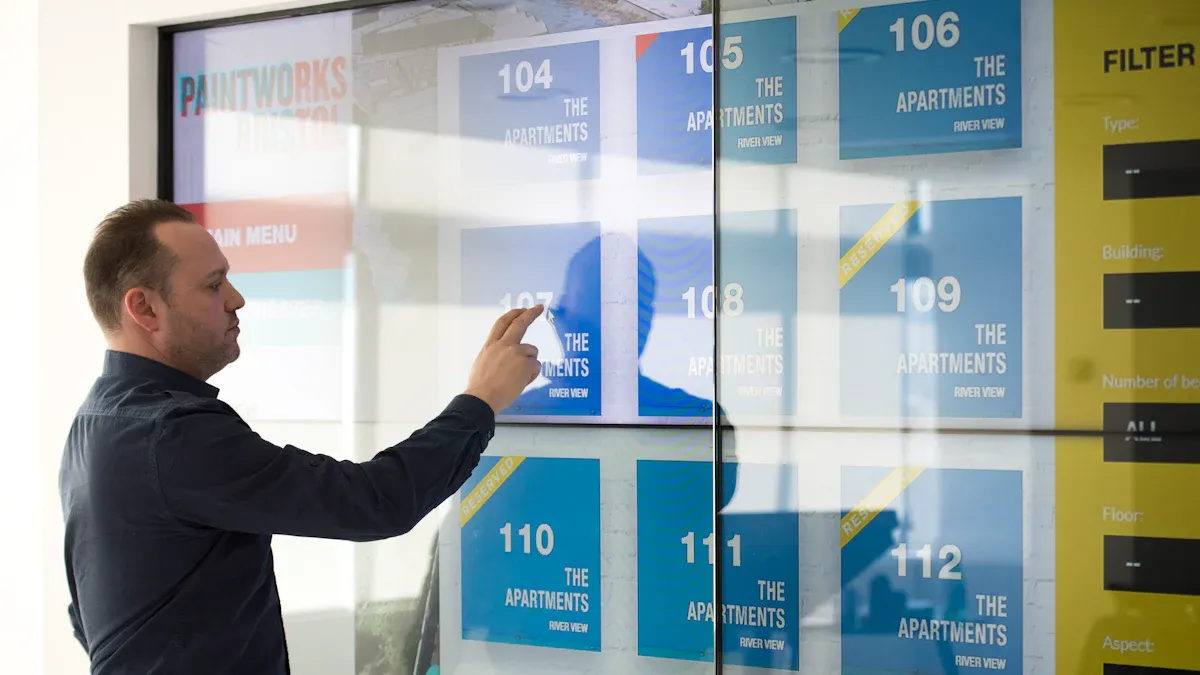
Touch Screen Signage Overview
Touch screen signage is everywhere now. You can use your fingers to interact with these screens. Touchscreen technology is found in computers, phones, and kiosks. Restaurants, airports, and malls have touch screen signage. These screens help you order food, find directions, or check in for flights.
A special layer on the screen senses your touch. This layer sits right on top of the display. When you touch it, the screen responds quickly. There are six main types of touchscreen technology:
Resistive film
Surface capacitive
Projected capacitive
Surface Acoustic Wave (SAW)
Optical imaging
Infrared
Touchscreen displays are popular because they are simple to use. You can tap, swipe, or scroll through menus and maps. Touch digital screen signage gives you information fast. Many kiosks use touchscreen technology to answer your questions in real time. These kiosks include floor-standing digital signage, digital menu boards, and self-checkout kiosks.
Tip: Touchscreen digital signage kiosks can track what you touch. This helps businesses know what you like.
Professional Non-Touch Display Overview
Professional non-touch display screens show information but do not let you touch them. You see these screens in airports, stores, and offices. They show ads, news, or directions. These screens are good for sharing messages with many people.
Professional non-touch display screens have special features:
They can run for long hours, even all day.
They are bright, so you can see them in light rooms.
They last a long time and give good value.
They have security features to stop tampering.
They are strong and can handle busy places.
They come with warranties for business use.
Digital signage kiosks come in many forms, like indoor LCD displays, LED screens, digital window displays, and video walls. These are important features of digital signage kiosks. You can choose touch or non-touch digital signage to fit your needs.
Key Features and Benefits
Digital Display Touch Advantages
Digital display touch technology can change your business. Touchscreen digital signage lets customers use your content right away. This makes the experience more fun and interesting. When you use a touchscreen, you give people choices. They can tap, swipe, or scroll to get what they want.
Some important features of touch screen digital signage help your business:
Customers spend more time with your indoor digital signage display if they can interact with it.
Touchscreen digital signage can make wait times feel shorter by up to 35%. People think time goes faster when they use it.
You can see how people use the screens. This helps you know what your customers like and make your promotions better.
Improvement Type | Description | Impact on Engagement |
|---|---|---|
Increased Dwell Time | Customers spend more time interacting with the signage. | Higher engagement levels |
Reduced Perceived Wait Times | Digital signage can reduce perceived wait times by up to 35%. | Improved customer satisfaction |
Analyzing User Interactions | Insights from user interactions help optimize promotions and store layout. | Enhanced decision-making |
Shoppers today want cool experiences. Digital display touch screens help you connect with your audience. You can use interactive kiosks and product discovery displays to keep people in your store longer. This can lead to more sales. Digital signage can raise retail sales by up to 33% with great visuals and special messages.
Tip: Touch screen digital signage gives you better customer engagement, more sales, and useful data for your business.
Touchscreen digital signage works in many places. You see it in malls, airports, and restaurants. You can use it to show menus, maps, or deals. The technology is simple to use and makes your indoor digital signage display stand out.
Non-Touch Display Benefits
Non-touch displays are great for busy places. You can use them to share important messages with lots of people. These screens show moving content that catches attention. You can update information fast, so your messages are always new.
Some main benefits of non-touch digital signage are:
You can grab customers with bright, moving pictures.
You can change content quickly for sales, events, or emergencies.
You save money over time compared to printed signs.
You can make messages for different groups and places.
You can grow your system as your business gets bigger.
You get more attention in busy areas.
Benefit | Description |
|---|---|
Visually Compelling Platform | Digital signage offers a dynamic way to communicate announcements and policy changes effectively. |
Accessibility | Ensures crucial information is available in unsupervised spaces, enhancing user experience. |
Crisis Management | Displays emergency procedures and safety instructions instantly during critical situations. |
You can use non-touch displays to share information in public spaces. These screens help you reach the right people at the right time. You can show emergency alerts, public service updates, or special deals. The bright screens make sure people see your message.
Note: Non-touch digital signage helps you share messages clearly and fast, even in busy places.
You can count on these displays for long hours and tough spots. They work well in airports, hospitals, and shopping centers. You can trust them to show your message every day.
Drawbacks and Considerations
Touch Screen Signage Challenges
Touch screen signage can have some problems for your business. These screens often need more care than you think. Here are some issues you might see:
Software can be hard to set up. You may need special programs to make touch screens work with your other systems.
Security is sometimes a problem. Touch screens may need extra steps to keep your data safe.
Hardware can break. If the screen gets dirty or scratched, it might stop working.
Sometimes the software freezes or does not work right.
The screen can go offline if there are connection problems.
Workers need training to use and manage these screens.
Tip: Clean your touch screens often and update them to keep them working well.
You should also think about repair and update costs. Touch screen signage may need more fixing than other displays. If many people use the screens, they can wear out faster.
Non-Touch Display Limitations
Non-touch digital signage has some limits too. You cannot touch these screens, so you only share information one way. This means you do not learn what your customers want right away.
Non-touch digital signage is good for public places. It gives important information without anyone touching the screen. This helps people find what they need and keeps everyone safe in busy areas. But you cannot collect data from users like you can with touch screens.
Non-touch digital signage may not fit every business goal. If you want more customer engagement or interactive experiences, you might need other tools. Non-touch digital signage works best for sharing news, alerts, or directions with big groups.
Think about your goals before picking non-touch digital signage. If you want more feedback or interaction, you may need to use other types of signage too.
Use Cases for Business

Interactive Touch Display Scenarios
You can use interactive touch displays in many places. These displays help businesses get more customers and sales. In stores, touch displays make shopping more fun. Shoppers see ads and sometimes buy things they did not plan to buy. About 16% of these surprise buys come from in-store displays. Customers can look at products, check prices, or find deals on the screen. This makes people interact with your business 60% more.
Scenario | Benefit |
|---|---|
Retail product discovery | More sales and happier customers |
Self-ordering in restaurants | 23% more customer happiness |
Hospitality check-in kiosks | Faster service and better guest experience |
Military training environments | Better teamwork and skill learning |
Touch displays work well in restaurants too. Guests can order food by themselves. This makes the average order size go up by 25%. People like using the menu on their own. This helps them feel loyal and happy. In hotels, touch display kiosks make check-in faster. They also give guests special information.
Tip: Interactive digital signage lets you see what customers like. You can use this data to make your business better.
Non-Touch Display Applications
Non-touch displays are good for sharing news with big groups. You see these screens in hospitals, banks, schools, and airports. They show messages, directions, or schedules. Non-touch digital signage helps people find their way with live maps and smart routes. You can change the info on the screen right away. This keeps everything up to date.
Healthcare: Give health tips and emergency alerts.
Retail: Show sales and store events.
Transportation: Help travelers with live updates.
Education: Announce events and class changes.
Entertainment: Show times and maps for venues.
Non-touch displays are better than old signs. They use bright pictures to get attention. These screens can work with phones for personal help. If something changes, like an elevator stops working, you can update the screen fast. You do not need to print new signs.
Note: Non-touch signage is a strong way to share messages with everyone in busy places.
Decision Factors
Customer Interaction
You want your digital signage to connect with people. Touch displays let users interact with the screen. They can tap, swipe, and look through menus or maps. This hands-on way makes people use the screen more. They stay longer and feel happier. Non-touch displays use things like QR codes or gesture recognition. These let people interact without touching the screen. But, people use these less than touch screens.
Interaction Type | Engagement Metrics | Description |
|---|---|---|
Touchscreens | Higher interaction rates, longer dwell time, increased user satisfaction | People touch the screen to tap and swipe. This makes them more interested. |
Non-Touch (QR codes, gesture recognition) | Alternative engagement methods, potentially lower interaction rates | People do not touch the screen. This is good for places where germs are a worry. |
Touch displays are best if you want people to interact a lot. Non-touch displays are better for sharing information with big groups fast. Both types help people pay attention. The best choice depends on how much you want people to use the screen.
Hygiene and Safety
Hygiene is important in places like hospitals and restaurants. Touch screens can get dirty when many people use them. You need to clean and wipe these screens often to keep them safe. Some touch screens have special layers to stop germs from spreading. Touchless technology, like gesture or QR code systems, helps lower the risk of spreading germs.
Consideration | Description |
|---|---|
Touchscreens can spread germs if many people use them and they are not cleaned. | |
Importance of Cleaning Protocols | You must clean and wipe screens often to stop sickness from spreading. |
Use of Antimicrobial Protection | Some screens have built-in protection to fight germs and keep things cleaner. |
Touchless Technology Benefits | Touchless screens help stop germs from spreading. This is very important in kitchens and hospitals. |
Tip: Use your digital signage to show messages about cleaning and safety. You can also use QR codes for check-ins without touching anything.
Cost and Maintenance
You should think about how much your signage will cost now and later. Touch displays usually cost more to buy and take care of. You might pay for touch overlays, kiosks, or big units. It costs more to fix and check them, especially if you have a lot. Non-touch displays cost less and are easier to keep working.
Type of Display | Average Cost Range |
|---|---|
Touch Overlays | Starting from $180 |
Basic Tabletop Kiosks | Starting around $700 |
Freestanding Units | $5,000 to $12,000 |
Outdoor Kiosks | $3,000 to $7,500 |
Installation (1-5 screens) | Starting at $500+ |
Complex Installations | Upwards of $2,000 |
Maintenance Costs | $200 per visit, with higher costs for larger networks |
Touch screens need cleaning and testing often. You may need to fix or update them. Non-touch displays need less cleaning and fixing. They last longer and work well in busy places.
Touchscreens need cleaning to get rid of fingerprints and germs.
You must disinfect them in busy areas.
Testing and fixing keeps touch features working.
Non-touch displays need less fixing.
ROI and Business Goals
Your business goals help you pick the right signage. Touch displays help you get more customer interaction and collect data. Non-touch displays help you share news and deals with lots of people. Both types can help you sell more and make customers happy.
Feature | Touch Displays | Non-Touch Displays |
|---|---|---|
User Interaction | Good for getting people involved | Good for showing messages to many people |
Best Use Cases | Best for places where people use the screen a lot | Best for ads and sharing info in busy places |
Cost | Costs more because of the technology | Cheaper for lots of screens |
Durability | Works best indoors | Made for outdoors and long hours |
Flexibility | Used in special places | Comes in many sizes and brightness levels |
Digital signage gives you a good return on your money. You can get up to 400% more views than with regular signs. About 76% of people go into stores because of digital signage. Sales can go up by almost 30% with interactive screens. Both types let you change messages fast and see how well they work.
Note: Pick your signage based on your business goals. If you want more customer interaction and data, choose touch displays. If you want to share news with lots of people, non-touch displays are a good choice.
Choosing the Right Solution
Comparing Touch and Non-Touch
You want the best digital signage for your business. You should think about how touch and non-touch displays work in different places. Touch screens let people use the screen and get involved. Non-touch screens show information for everyone to see. Look at the table below to compare both types:
Criteria | Touch Digital Signage | Non-Touch Digital Signage |
|---|---|---|
Target Consumer | Engages users directly | Passive viewing |
Intended Message | Interactive, allows for user queries | Static, may scroll messages |
Placement | Best for areas with user interaction | Suitable for waiting areas |
Timing of Viewership | Users can access information on demand | Information is displayed in a loop |
Effectiveness Measurement | Can track user interactions | Relies on viewership analytics |
Cost | Generally higher due to technology | Lower initial investment |
Maintenance | Requires more upkeep and customization | Easier to maintain |
User Interaction | High, allows for direct engagement | Low, primarily displays information |
Touch displays help people join in and learn new things. Non-touch displays are good for sharing news or updates with lots of people. You can see how well touch screens work by checking what people do on them. Non-touch screens use numbers to see how many people look at the screen.
Complementary Use in Business
You can use both touch and non-touch signage to make your business better. Using both helps you reach more people and share messages in different ways. For example, touch screens can help people find products. Non-touch screens can show news or important updates. The table below shows how using both types can help your business:
Reason | Benefit |
|---|---|
Streamlined Communication | Ensures that all locations display important corporate messages simultaneously. |
Seamless Collaboration | Users across multiple sites can work together effectively. |
Ease of Management | Simplifies real-time updates across multiple locations, allowing for scheduled content. |
Tailored Content by Audience | Utilizes the same platform to target different audiences with relevant information. |
Cost Efficiency | Reduces content creation costs and simplifies management through a centralized library. |
Using both types of digital signage gives your customers a better experience. You can share important news and let people interact with your screens. You save time and money by managing all your screens from one place. You also make sure everyone gets the right message when they need it.
Tip: Try using both touch and non-touch signage together. This helps you reach more people and makes your business stronger.
You have big choices when you pick indoor digital signage. Touch displays help people get more involved with your content. Non-touch displays are good for telling lots of people information. Look at this table to see the differences:
Decision Point | Touch Displays | Non-Touch Displays |
|---|---|---|
Content Interaction | High engagement | Limited interaction |
Cost | Lower initial investment | |
Maintenance | Easier in accessible spots | Needs strong setup |
Think about what you want and how much space you have. You can talk to a digital signage expert if you need help. Pick the best choice for your business.
FAQ
What is the main difference between touch and non-touch displays?
You can interact with a touch display by tapping or swiping the screen. A non-touch display only shows information. You cannot control it with your hands.
Where should you use touch screens in your business?
You should use touch screens in places where customers need to make choices. These include self-service kiosks, product finders, or check-in stations.
Are non-touch displays better for busy public areas?
Yes. Non-touch displays work well in busy places. They share messages with many people at once. You do not need to worry about cleaning fingerprints.
How do you keep touch screens clean and safe?
You should clean touch screens often. Use a soft cloth and safe cleaner. This keeps the screen clear and helps stop germs from spreading.
Can digital signage help your business grow?
Yes. Digital signage can attract more customers. It shows bright images and updates fast. You can share news, deals, or directions with everyone.
See Also
Understanding Digital Signage Displays Compared To Traditional TVs
The Role Of Digital Signage In Enhancing Customer Interaction
Evaluating Indoor And Outdoor Digital LED Signage Choices
Selecting The Perfect LED Display Sign For Your Company
Customized Digital Signage Solutions For Various Business Sectors
