Ten Essential Tips for Setting Up Outdoor Digital Signage Displays


You want people to notice your message. Outdoor digital signage display helps a lot. Many businesses see good results. About 64% of users say they get more customers with the right setup. But there are hard problems outside. Bad weather can break a digital signage display if you do not use weatherproofing. Sunlight makes screens hard to see without enough brightness. You also need to think about safety. You want to catch the eye of people walking by. If you pick smart hardware and use bold content, your digital signage display will stand out anywhere.
Key Takeaways
Pick weatherproof hardware with IP65 or IP66 ratings. This keeps your outdoor displays safe from rain and dust.
Use high-brightness screens with at least 2,000 nits. This helps people see your content in bright sunlight.
Put your digital signage at eye level for best viewing. It should be about 5 to 7 feet high for people walking by.
Make your content with big fonts and strong colors. This makes messages easy to read from far away.
Do regular maintenance checks every one to three months. This keeps your displays clean and working well.
Weatherproof Hardware and Outdoor TV Enclosures
Outdoor digital signage has many problems to face. Rain, dust, heat, and people can hurt your screens. You want your message to show every day. That is why picking the right hardware is important. Weather-proof solutions help protect your investment. They also make your display last longer.
Use IP-rated Outdoor TV Enclosures
You need outdoor tv enclosures that can handle weather. IP ratings tell you how well an enclosure blocks dust and water. Here is a simple guide to help you pick the right hardware:
IP Rating | Solid Protection | Liquid Protection | Best For |
|---|---|---|---|
IP55 | Limited dust protection | Water jets from garden hoses | Residential outdoor spaces |
IP65 | Fully dustproof | Water-resistant against powerful jets | Exposed outdoor equipment, industrial settings |
IP66 | Fully dustproof | High-pressure water jets | Extreme weather conditions, commercial applications |
If you want your outdoor tv enclosures to last, choose IP65 or IP66. These ratings mean your screens can handle storms, dust, and strong water jets.
Tip: Weatherproofed signage lasts longer than normal screens. You get better protection from weather. Your equipment stays in good shape for years.
Choose Vandal-resistant Materials
People sometimes try to break outdoor tv enclosures. You can stop most damage by picking strong materials. Look for these features:
Tempered or laminated glass does not break or scratch easily.
Metal enclosures stop people from breaking in.
Locking mechanisms keep thieves away.
Shock-resistant mounts take hits from accidents or flying things.
When you use these materials, your display can handle nature and people. You will not have to fix things as much. You can focus on showing your message.
Optimize Outdoor Digital Display Brightness

You want your outdoor digital signage to shine, even on the sunniest days. If your screen looks dim, people will walk by without noticing your message. That is why you need to focus on brightness from the start. Sunlight can wash out colors and make your display hard to read. You can solve this with the right technology and a few smart choices.
Select High-brightness Screens (2000+ Nits)
Not all screens work well outside. You need a display that can handle high-brightness outdoor viewing. Regular indoor screens usually have 300 to 500 nits of brightness. That is not enough for outdoor use. For shaded outdoor areas, you should look for at least 1,500 to 2,000 nits. If your display sits in direct sunlight, you need 2,500 nits or more. Storefront windows and high-glare spots do best with 4,000 nits or higher.
Here is a quick guide to help you pick the right brightness level:
Condition | Brightness Level (nits) |
|---|---|
Shaded exteriors | 1,500–2,000 |
Direct sunlight | 2,500 |
High-glare zones | 3,000–4,000 |
Outdoor kiosks | 2,500+ |
Storefront windows | 4,000+ |
Tip: Higher brightness means your content stays clear and colorful, even when the sun is bright.
Add Anti-glare and Anti-reflective Coatings
Glare can ruin your display, no matter how high the brightness. You want people to see your message, not their own reflection. Anti-glare and anti-reflective coatings help a lot. These features cut down on reflections and boost clarity.
Matte screen coatings spread out light, so you get less glare.
Polarized filters keep the display bright while reducing shine.
High contrast ratios (5,000:1 or more) make your content pop, even in tough lighting.
Optical bonding removes internal reflections, so images look sharp.
UV and IR blocking coatings protect your screen from sun damage and keep brightness steady over time.
If you combine high brightness with these coatings, your outdoor digital signage will always look its best. People will notice your message, no matter the weather or time of day.
Strategic Location for Digital Signage Display
Choosing the right spot for your outdoor display is very important. You want your display where people walk, drive, or gather. If lots of people see it, your message reaches more eyes. About 70% of Americans saw a digital billboard or digital signage last month. Picking a good spot helps you get noticed by more people.
Here’s a table to help you think about what matters most when picking a location for outdoor installations:
Factor | Why It Matters |
|---|---|
Content Development | New and interesting content gets more attention. |
Screen Requirements | Bright screens and strong enclosures last outside. |
Power Considerations | Good power keeps your display working all the time. |
Security | Security stops damage or theft and saves money. |
Network Requirements | Strong connections help your content update fast. |
Ongoing Management and Maintenance | Regular checks keep your display looking good and working well. |
Analyze Audience Distance and Viewing Angles
You want people to read your message without trouble. Think about how far away people stand or drive. Use the 3:5:8 rule for text size. For every 5 feet away, use 3-inch tall letters. For best reading, plan for 8 feet. Put your screen so people see it straight on, not from the side. Do not put your display behind trees, poles, or other things. When you get the angle right, more people remember your ad. Almost 55% of people remember ads on outdoor digital billboards.
Put screens where people look naturally.
Make sure nothing blocks the view.
Change height and angle for your audience.
Tip: If your display is in a busy place with a clear view, more people will remember your message.
Install at Eye Level for Maximum Impact
Eye level is the best place to get attention. For people walking, put your display 5 to 7 feet high. For drivers, signs need to be higher than cars and trucks. When you put your display at eye level, people can see and read it easily. This helps your outdoor display stand out. The right spot means your message gets seen and remembered.
Pedestrian zones: 5–7 feet high
Roadside signs: higher to clear vehicles
If you focus on location and viewing angles, your digital signage works better. People will see, remember, and act on your message.
Effective Outdoor Digital Signage Content Design
You want your outdoor display to get noticed. The right content plan makes your message easy to see. Outdoor screens face sunlight and distractions. You need to design your content for these problems.
Use Large Fonts and High-contrast Colors
Big fonts help people read your message from far away. Outdoor digital signage needs fonts much bigger than indoor signs. Make your text at least 40% larger than what you use inside. This helps drivers and walkers see your words fast.
Large text gets attention right away.
Short, bold headlines work better than long sentences.
Simple words help everyone understand your message.
High-contrast colors make your text stand out. You want strong contrast between your text and the background. For example, use white letters on black or yellow on dark blue. These color choices make your content easy to read, even in bright sunlight.
Tip: Pick bold fonts and high-contrast color pairs. This makes your effective digital signage easy to spot in busy outdoor places.
Prioritize High-quality Visuals and Vibrant Colors
Images and videos should look sharp and clear. High-resolution visuals stay crisp, even on big screens. Blurry or pixelated pictures make people look away. You want your content plan to use only high quality content.
Here’s a quick checklist for effective digital signage visuals:
Use high-resolution images and videos. These stay bright and clear in sunlight.
Choose bold, vibrant colors. They catch the eye and make your message stand out.
A strong content plan uses simple layouts, big fonts, and clear images. This helps your outdoor display get noticed and remembered.
Do’s for Outdoor Content Design | Don’ts for Outdoor Content Design |
|---|---|
Use large, bold fonts | Use small or thin text |
Pick high-contrast colors | Use low-contrast or similar colors |
Show high-resolution visuals | Use blurry or pixelated images |
Keep messages short and clear | Add too much text or clutter |
If you follow these tips, your outdoor digital signage will stand out. People will see your message, even from far away.
Security for Outdoor Digital Signage
Outdoor digital signage has more dangers than indoor screens. You must think about vandalism, theft, and cyber attacks. If you want to keep your display safe, use strong security steps. Good protection keeps your investment safe. It also helps your message reach people every day.
Physical Locks and Tamper Alarms
Vandalism can happen at any time, especially in busy places. You want to stop people from messing with your equipment. Physical locks and tamper alarms help protect your display. Here are some smart ways to keep your display safe:
Use secure enclosures that block people who should not get in. These enclosures keep out people who want to damage your screen.
Put surveillance cameras near your signage. Cameras scare away most people who might try to break your display.
Limit who can get close to your digital signage. Fewer people near your display means less chance of vandalism.
Do regular security checks. These checks help you find weak spots before someone tries to break in.
If you follow these steps, you lower the risk of vandalism and theft. You also keep out moisture and dust, which adds more protection.
Tip: Tamper alarms tell you right away if someone tries to open or damage your enclosure. Quick action can stop vandalism before it gets worse.
Secure Network Connections
Outdoor digital signage connects to networks for updates and control. This connection can attract cyber threats. You need strong protection to keep hackers away and stop online vandalism. Try these steps for safer network connections:
Set up strong user checks. Only trusted people should use your system.
Use encryption for all data and connections. Encryption keeps important information safe from hackers.
Back up your data often. If someone breaks in, you can get your content back fast.
Run regular security checks on your network. These checks help you find problems before they cause damage.
Pick cloud-based CMS providers that test for weaknesses. Penetration testing and vulnerability checks add more protection.
Make sure both software and hardware have security features. This stops people from getting in and keeps your display safe from vandalism.
Outdoor screens face moisture, dust, and cyber threats. You need to protect your display from all sides. If you use strong locks, alarms, and secure network connections, you get better protection against vandalism and moisture. Your outdoor digital signage will last longer and work better.
Remote Management and Monitoring
Taking care of outdoor digital signage can be hard. Sometimes your screens are far from your office. You want them to work well without driving everywhere. Remote management helps you do this and saves time.
Cloud-based Control Systems
Cloud-based control systems let you manage screens from anywhere. You can use a computer or phone to check your screens. You can update messages or fix problems without going back to the office.
You can solve problems from any place, even when traveling.
Remote management means you travel less and visit sites less.
You spend less money on hardware and other equipment.
Here’s a table that shows why cloud-based control systems are helpful:
Advantage | Description |
|---|---|
Real-time updates | Change your content right away on all screens. Your messages stay new and important. |
Centralized management | Control everything from one website. You do not need devices at every location. |
Ease of use | Upload media and send it to screens with a few clicks. No need to update on-site. |
You can manage your content better because you can update from anywhere. This keeps your outdoor digital signage fresh and interesting.
Real-time Alerts and Diagnostics
You want your screens to work all the time. Real-time alerts and diagnostics help you find problems fast. If a screen goes black or breaks, you get a message right away.
Evidence | Description |
|---|---|
Remote Monitoring | You get alerts right away for things like black screens or broken hardware. |
Performance Logs | The system checks temperature, connection, and playback. Alerts show up if something is wrong. |
System Alerts | Messages help you fix problems before they get worse. |
Efficiency Gains | Companies using these tools have less downtime and better results. |
Issue Identification | Most problems, like power cycles or content refreshes, can be fixed from far away. |
With these tools, your screens keep working and your content stays on track. You spend less time fixing things and more time sharing your message.
Maintenance Planning for Outdoor Digital Displays
Routine Inspections and Cleaning
You want your outdoor digital signage to last. Regular maintenance is the secret to great durability. Outdoor environments can be tough on your screens. Rain, dust, and sunlight all try to wear down your display. If you ignore small problems, they can turn into big headaches.
You should check and clean your displays every one to three months. This routine keeps your outdoor installations looking sharp and working well. Here’s what you can do:
Wipe away dust, dirt, and fingerprints from the screen.
Inspect for cracks, loose wires, or water spots.
Test the brightness and color to make sure everything looks right.
Check that the enclosure seals tight against moisture and bugs.
When you stick to this schedule, you catch small issues before they grow. Your display will keep shining in all outdoor environments. You also boost the durability of your investment.
Tip: Set reminders on your calendar for inspections. Consistency helps your outdoor installations stay reliable.
Keep Spare Parts Available
You never know when something might break. Outdoor environments can surprise you with sudden storms or accidents. If you keep spare parts on hand, you fix problems fast and avoid long waits.
Here’s how you can make your maintenance plan even stronger:
Track how often you use parts like filters, fans, or cables.
Set a minimum stock level for important components. Think about how long it takes to get new parts.
Build good relationships with your vendors. Quick deliveries mean less downtime.
Sort your spare parts by how critical they are. Focus on the pieces that matter most for durability.
When you plan ahead, you keep your outdoor digital signage running in all kinds of outdoor environments. You protect your installation and make sure your display stays up and running. Good planning means better durability and less stress for you.
Analytics for Effective Outdoor Digital Signage
You want your outdoor digital signage to work its best. Analytics help you see what works and what needs to change. When you track the right numbers, you can make smart choices and get better results in all kinds of conditions.
Track Engagement Metrics
You can measure how people interact with your display. These numbers tell you if your message stands out or if you need to try something new. Here are the top engagement metrics you should watch:
Dwell Time: See how long people watch your screen. This helps with promotions and teaching moments.
Session Count: Track how many times people use interactive features. This shows real customer engagement.
Conversion Rate: Find out how many people take action, like buying something or signing up.
Engagement Rate: Compare how many people see your display to how many interact with it.
Click-Through Rate (CTR): Count how many taps or clicks happen for each view.
Recall Rate: Learn how well people remember your message later.
ROI (Return on Investment): Check if your display brings in more money than it costs.
Tip: When you track these numbers in different conditions, you learn what works best for your audience.
Adjust Content Based on Data
You can use your analytics to make your content even better. Changing your message based on real data helps you reach more people, no matter the conditions outside. Here are some smart ways to adjust your content:
Strategy | Description |
|---|---|
Use AI to study live data and change your content quickly. This keeps people interested in all conditions. | |
Audience analytics | Change your message to fit who is watching. You can match your content to the age or habits of your viewers. |
Contextual triggers | Use outside factors like weather or time of day. For example, show umbrella ads when rainy conditions appear. |
When you use analytics, you can test new ideas and see what works in different conditions. This helps your outdoor digital signage stay fresh and effective.
Interactivity in Outdoor Digital Signage
When you add interactive features, your outdoor digital signage gets more fun. People like to touch, scan, and play with screens. If you give them something to do, they pay more attention. They also remember your brand better.
Add Touchscreens or QR Codes
Touchscreens and QR codes make your outdoor display more interesting. These tools let people join in and explore your content.
Touchscreen LED displays let people tap and swipe. They can scroll through your interactive content. This makes your advertising feel new and personal.
QR codes help customers connect with your brand fast. People can scan a code with their phone. They can visit your website or social media page.
QR codes also let you share special deals or contests. You can give out coupons. This brings more people to your online pages.
With these features, your outdoor signage is more than just a sign. You create a two-way street. People can learn, play, and shop.
Interactive digital signage gets 47% more engagement than static displays. Almost twice as many people will notice and interact with your message.
Encourage Audience Participation
You want people to do more than just look at your display. You want them to join in and take action. Audience participation makes your outdoor digital signage campaign stronger.
Show your social media handles and hashtags on your screen. This helps people find you online. They can share their own stories.
Display user-generated content, like photos or reviews. This builds trust and connects your physical and digital marketing.
Add clear calls to action (CTAs). Ask people to scan a QR code. Tell them to visit your website or download your app for special offers.
Use interactive content to get people involved. Let them vote, play games, or answer questions right on the screen.
When you encourage participation, your display becomes a community hub. People feel involved and want to come back. Your dynamic content gives you more value because it keeps changing and stays interesting.
Cost Management and ROI Planning
Budget for Installation and Upkeep
You want your outdoor digital signage to last and work well. Planning your budget helps you avoid surprise costs. The price changes based on how many displays you need. Where you put your screens also matters. Hard-to-reach places cost more to set up. If you need strong support, the price goes up. Weatherproofing means you need extra steps and materials. You also have to clean and fix your screens often. This keeps them looking good.
Here’s a table that shows common costs for outdoor digital signage:
Pricing Model | Typical Range | Extra Outdoor Costs |
|---|---|---|
Per display/month | $15–$150/display/month | Weather monitoring, environmental features |
Tiered subscriptions | $50–$500/month per tier | Advanced outdoor capabilities |
Usage-based | $0.05–$0.50 per operation | Larger file sizes cost more |
Enterprise licensing | $10,000–$100,000+/year | Dedicated outdoor support |
Hardware-bundled | $2,000–$20,000+ per display | Weather-resistant hardware |
Revenue sharing | 10–30% of ad revenue | Outdoor premium rates |
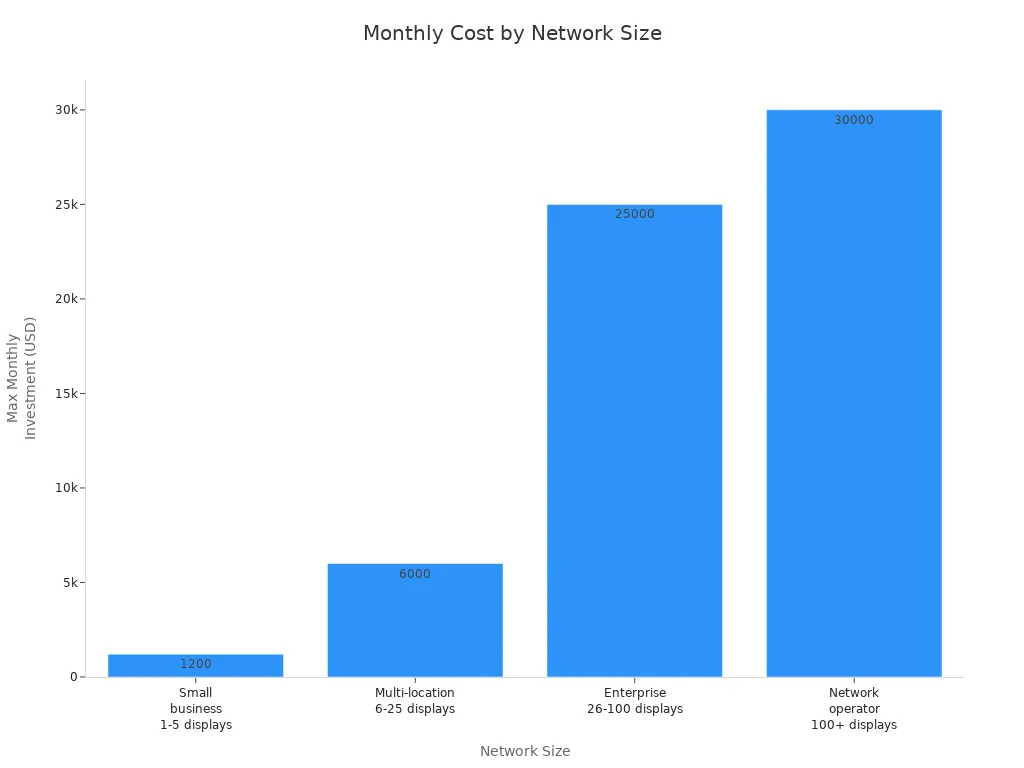
If you have a small business with a few screens, you might spend $200 to $1,200 each month. Bigger networks pay even more. Look at this chart to see how costs go up when you add more displays:
Tip: Clean your screens often and fix problems fast. This helps your screens last longer and saves money later.
Evaluate Long-term Value
You want to know if your money is well spent. Tracking results helps you see the real value. Watch how many people walk by and visit your business after you add digital signage. QR codes on your screens help you count how many people interact and buy something. Ask your customers how they found you. Many will say they saw your digital signs. Compare your sales before and after you start using digital signage. This shows if your displays help your business grow.
Count how many people visit your store.
Use QR codes to see who interacts and buys.
Ask customers how they heard about you.
Compare your sales before and after you use digital signage.
Note: Smart budgeting and checking your results often helps you get the most from your outdoor digital signage.
If you use these ten tips, your outdoor digital signage will look great and last longer. You grow your digital reach, get people to join in, and make a big difference. Checking and updating your screens often keeps them bright and working well:
Maintenance Task | Why It Matters |
|---|---|
Clean screens | Makes pictures clear and easy to see |
Fixes problems and gives new tools | |
Inspect hardware | Stops your screens from getting too hot or breaking |
Want to know more? Look at these helpful resources:
Outdoor Signage: Transforming Business Visibility and Engagement
OUTDOOR SIGNAGE
2026 Best Outdoor Digital Signage Solutions for Your Business?
FAQ
How do you keep outdoor digital signage safe from bad weather?
You should use IP-rated enclosures. These keep out rain, dust, and snow. Pick strong materials like tempered glass and metal. Check your seals often. Your display will last longer.
What brightness level works best for outdoor screens?
Go for screens with at least 2,000 nits. If your display sits in direct sunlight, choose 2,500 nits or more. High brightness keeps your message clear and easy to read.
How often should you clean and check your outdoor display?
Set a reminder to inspect your display every one to three months. Clean the screen, check for damage, and test brightness. Regular care helps your display look great and work well.
Is outdoor digital signage expensive to maintain?
You can manage costs with a good plan. Budget for cleaning, repairs, and spare parts. Most problems are small if you catch them early. Smart planning saves money over time.
See Also
Creating Engaging Digital Signage Displays for Your Business
Setting Up Digital Signage Monitors for Optimal Effectiveness
Evaluating Indoor and Outdoor Digital LED Signage Choices
Understanding Digital Signage Displays: Tech, Advantages, and Strategies
Achieving High ROI Through Effective Digital Signage Implementation
