Pros and Cons of Interactive Versus Non-Interactive Digital Signage Displays

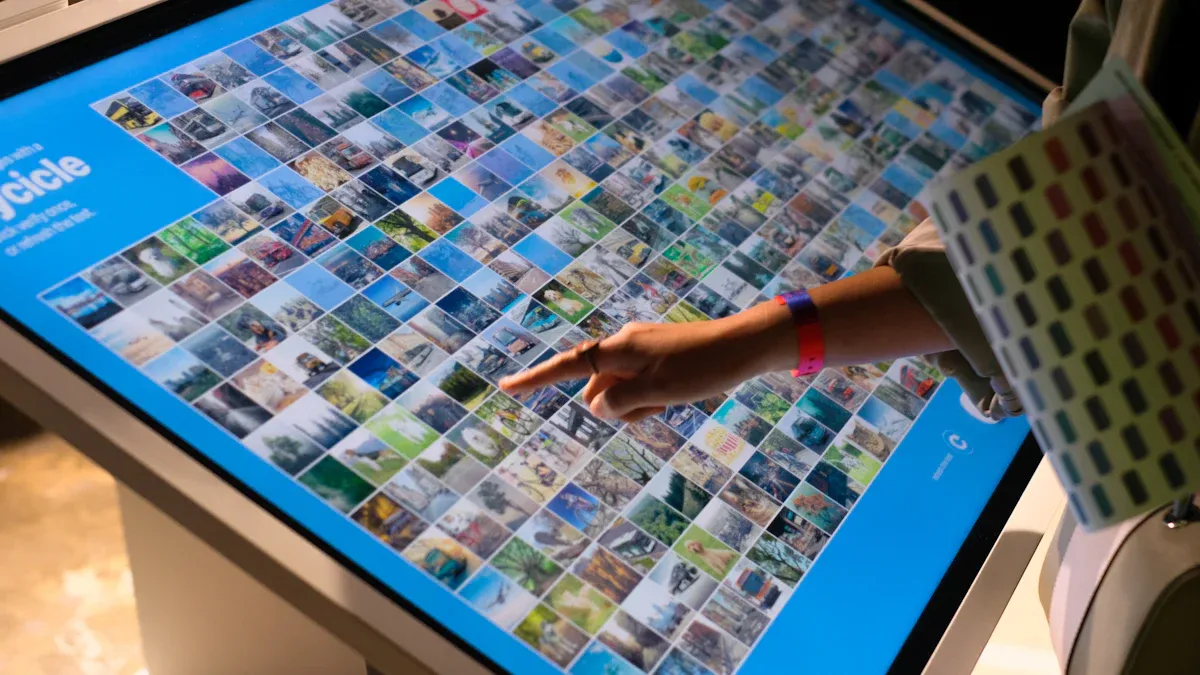
You have lots of options when picking a digital signage display for your business. The best display can show off products. It can share deals right away. It can help customers choose what to buy. Many people buy things they did not plan to after seeing a digital sign. Almost half of shoppers pick a featured item instead of what they first wanted.
Stores use digital signage to help sell more and show new products.
Restaurants use it to show menu items clearly, so guests choose faster.
Service businesses use it to share news and promote extra services.
Key Takeaways
Pick interactive displays if you want to get customers involved and gather information. They make things more fun and can help you sell more.
Non-interactive displays cost less and are simple to use. They are good for showing easy messages to lots of people.
Think about what your business wants to do before you pick a display. Interactive displays are great for getting people to join in, but non-interactive ones are better for sharing clear facts.
Make sure to think about growing in the future. Choose a system that can grow with your business and handle new things to show.
Look at how much money you have to spend. Interactive displays cost more at first, but non-interactive ones help you save money when you start.
Digital Signage Display Types
Interactive Displays Defined
Interactive displays let you use digital content right away. You can touch, swipe, or move your hand to pick what you see. These displays are often touchscreen kiosks or big screens in public places. You might use them in stores to look at products or in airports to check flights. They help you find answers fast and make your own choices. Interactive displays also learn what you like, so businesses can show you better content.
Non-Interactive Displays Defined
Non-interactive digital signage displays show things but you cannot control them. You see these in restaurants with menu boards or in hospitals with health tips. These displays are good for sharing news, deals, or directions. You do not touch or change the screen. The content changes on a schedule or when staff update it. Non-interactive displays are made to reach lots of people at once.
Key Differences
There are some big differences between interactive and non-interactive displays. Interactive displays let you take part and not just watch. You spend more time with the screen and can get special offers. Non-interactive displays only give you information, so you just watch.
Here is a quick comparison:
Feature | Non-Interactive Displays | Interactive Displays |
|---|---|---|
Communication Type | One-way | Two-way |
User Engagement | Passive viewing | Active participation |
Content Management | Simple, less frequent updates | Dynamic, responds to user input |
Lower | Higher | |
Long-term Efficiency | May cost more over time | Often more durable and efficient |
Tip: Use interactive displays if you want people to join in or if you need to collect customer data. Non-interactive displays are best for sharing simple messages with many people.
You can see digital signage in many places:
Retail stores for sales
Restaurants for menus
Airports for flight info
Hospitals for patient news
Schools for campus updates
Interactive displays give you more choices and control. Non-interactive displays are easy to use and reach many people. Pick the one that fits your goals and how much you want people to join in.
Interactive Digital Signage Display Pros

User Engagement
Interactive displays change how you get information. You do more than just look. You join in and take part. You can touch, swipe, or talk to the screen. This makes you feel closer to the brand. Bright colors and moving images grab your attention. People walking by often stop to look. AI-powered displays show things you like. This makes you want to stay longer. Businesses that update content quickly see more people join in. Dynamic content can make customer interaction go up by 400%. Interactive displays also help you wait less. This makes your visit better and more fun.
Interactive displays get people involved and build a bond.
AI-powered screens show things that interest you.
Brightness and movement bring in more viewers.
Fast updates make more people pay attention.
Dynamic content can make interaction go up by 400%.
Interactive displays help you wait less and feel happier.
Flexibility & Control
Interactive displays give you more control. You can change what shows up fast. This means you can share different messages at different times. You can update content from anywhere. You always show the newest news or deals. For example, the Lima Stock Exchange used digital signage to show live financial data. This helped people get the latest info. Studies say people remember 83% of what they see on digital signage. This is much more than old signs.
Here is a table that compares interactive displays to static signs:
Feature | Static Signage | Dynamic Digital Signage |
|---|---|---|
Content Updates | Manual and slow | Fast and automated |
Flexibility | Fixed messages | Flexible and adaptable |
Relevance | Often outdated | Timely and tailored |
Interactive displays work well with other systems. You can link them to your website or social media. You can also connect them to inventory tools. This helps you keep your content fresh and helpful. Interactive whiteboards and projectors in classrooms help teachers and students work together. This makes learning more fun and helps everyone join in.
ROI & Insights
Interactive displays help you see what works best. You can track sales and see how long people use the screens. You can test which content people like most. This helps you pick the best things to show. You save money because you do not need to print new signs. You also make fewer mistakes since you can change things right away. When people spend more time with your display, they remember your message better. Interactive displays help people take action, which can boost sales. Real-time data lets you change your plan quickly.
Sales uplift shows how much money you make after using interactive displays.
Customer engagement metrics like time spent and clicks show what works.
You save money by printing less.
You work faster with instant updates.
A/B testing helps you find the best content.
Real-time data helps you target better and get good results.
Impactful Experiences
Interactive displays make visits special for customers. You can use cool technology to make shopping or learning more fun. Interactive displays let you show different things to each person. This makes every visit feel unique. In stores, interactive displays can help sell more and make people like your brand. For example, Schutrups used interactive displays to show products. They saw more people join in and buy things. Navori’s platform helps brands connect with customers. This leads to better choices when buying.
Case Study | Impact on Engagement and Brand Perception |
|---|---|
Schutrups | Made shopping better and increased sales with interactive displays. |
Navori's platform | Helped brands connect and influence what people buy. |
Digital signage brings in up to 400% more viewers than old signs. It can help people decide what to buy by showing cool content at the right time. Interactive displays also work with other tools. This makes it easy to give people a smooth experience. These things matter when you want to stand out and offer something special.
Tip: Use interactive displays to make experiences people remember. This helps your brand grow and keeps customers coming back.
Interactive Digital Signage Display Cons
Higher Costs
Interactive displays usually cost more than non-interactive ones. You pay for more than just the screen. There are extra costs for software and hardware. Licenses also add to the price. These costs keep coming as long as you use the display. You need to think about all the money you will spend over time. This is called the total cost of ownership. It means you look at every cost, not just the first one. Interactive displays have cool features and moving content. But you need to plan for both the first payment and the regular bills.
You pay for hardware, software, and licenses.
Updates and support can cost more over time.
Dynamic content and special features are great, but they cost extra.
Note: Digital signage can save money on printing. But interactive displays still need more money than old signs.
Maintenance Challenges
Interactive displays need care to keep working well. You must update the software often. If something breaks, you need to fix it fast. Touchscreens and sensors can stop working or get dirty. Sometimes you need to replace parts or call someone to repair them. If you have many screens, it can be hard to manage them all. You need to check for problems and make sure the right content shows up. You may need to update content quickly to keep things fresh.
Touchscreens and sensors need cleaning and fixing.
Software updates keep your system safe and working.
Managing lots of screens takes time and work.
Fast updates help keep the experience good.
Complex Installation
Setting up interactive displays can be hard. You need to plan for network access. Everything must connect the right way. If you do not set it up well, you might have delays. You need to make sure your other systems work with the display. Sometimes you need special equipment to help everything work together. This makes it easier to fix problems later.
Installation can take longer because of network needs.
All parts must work together for smooth use.
A good setup helps stop problems with compatibility.
Fast updates need strong management tools.
Tip: Plan your setup carefully. Good planning makes your display easier to use and fix.
Security Concerns
Interactive displays connect to networks and collect data. This can make them a target for hackers. You could face problems like people stealing information. Bad software can change what shows on your screen. Someone could try to break your system by sending too much data. People might even try to mess with your screens in person. You also need to think about privacy. If you collect too much data or do not protect it, you could have trouble.
Here are some common risks and ways to stay safe:
Security Risk | What Can Happen | How to Protect Yourself |
|---|---|---|
Network eavesdropping | Hackers steal sensitive info | Use encryption protocols |
Malware attacks | Bad software changes content | Update software often |
DoS attacks | Network gets overloaded | Use strong authentication |
Physical tampering | Devices get damaged or hacked | Add physical security controls |
Too much data collected | Limit data and use anonymization |
You can lower these risks by using strong passwords and data encryption. Update your software often to stay safe. Only let trusted people use your system. Keep your devices safe from people who want to break them. Good security keeps your displays working and protects your users.
Alert: Always check your security settings and update your software. This helps keep your digital signage safe from threats.
Non-Interactive Digital Signage Display Pros

Simplicity
Non-interactive digital signage displays are easy to set up. You do not need special training or skills. The system uses basic hardware and software. Everyone sees the content without needing to interact. You can use simple screens and easy controls. This makes things smooth and not stressful. You do not have to worry about extra features or hard setups. You just focus on sharing your message.
Lower Investment
Non-interactive digital signage helps you save money. You pay less for hardware and setup. Many small businesses use smart TVs and wall mounts. A TV costs about $500 and installation is $200. You pay around $20 each month for a subscription. Most businesses spend about $240 per screen each year. The yearly cost is usually $500 to $800 per screen. You get good value for what you spend.
Expense Type | Description | Cost |
|---|---|---|
One-time | Smart TV | $500 |
One-time | Wall mount installation | $200 |
Monthly | Juuno subscription | $20/month |
Tip: Start with one screen and add more as your business grows.
Easy Management
It is easy to manage non-interactive digital signage displays. You do not need to learn hard systems. You update your content with simple cloud software. If you need help, you get fast support. You do not get frustrated by extra features. The system is easy, so more people use it. You spend less time fixing things and more time on your business.
Feature | Non-Interactive Displays | Interactive Displays |
|---|---|---|
Cost | Much lower cost | Higher cost |
Management Complexity | Simple and easy to manage | Complex with extra features |
User Adoption | High because it is easy to use | Some users get frustrated |
Support | Fast help with easy software | Needs more technical support |
Broad Reach
Non-interactive digital signage lets you reach many people. You show your content to everyone who walks by. People do not need to touch or use the screen. You share news, deals, and directions with a big group. You keep your message fresh with scheduled updates. You do not worry about special devices. You focus on clear messages and your business goals.
Note: Non-interactive displays work well in busy places like stores, hospitals, and schools. You reach more people and keep your message simple.
Non-Interactive Digital Signage Display Cons
Limited Engagement
Non-interactive digital signage displays do not let you join in. You only watch what is on the screen. You cannot touch or pick what you see. This can make you lose interest fast. Many people walk by and do not stop. You do not feel close to the message. Businesses miss chances to make your visit special. You might not remember what you saw as well.
Tip: Interactive displays help people join in and remember messages better.
Less Flexibility
Non-interactive displays cannot change content quickly. You have to plan updates before time. You cannot react fast to new news or trends. This can make your message seem old. Businesses need to keep things fresh to keep people interested. Digital signage works best when you can update it often and easily.
Here is a table that shows how flexible each display is:
Feature | Non-Interactive Display | Interactive Display |
|---|---|---|
Content Updates | Scheduled, less often | Real-time, frequent |
Response to Trends | Slow | Fast |
Campaign Effectiveness | Lower | Higher |
You cannot react fast to changes in the market.
You might miss new chances.
Your campaigns may not work as well.
Static Messaging
Non-interactive displays show the same thing to everyone. You cannot change the message for different people. This makes it less personal for viewers. People may ignore the screen if it never changes. You do not get to pick what matters to you. The message stays the same until someone updates it.
Note: If your message never changes, people may get bored and stop looking.
Minimal Data Collection
Non-interactive displays do not collect much data. You do not know who watched or what they liked. You cannot track how many people saw your message. This makes it hard to make your content better. Businesses cannot learn what works best for their audience. You miss chances to improve your digital signage over time.
If you want to learn from your viewers, interactive displays give you more data. Data helps you make a better experience for everyone.
Choosing Your Digital Signage Display
Business Needs
Start by thinking about what you want to do. Do you want people to join in or just see information? If you want people to join in, use interactive displays. If you only need to share news, non-interactive screens work well. Use this table to help you pick the right display:
Criteria | Description |
|---|---|
Location | Decide if your display is inside or outside. Check if it needs to be bright or handle rain. |
Budget | Look at how much each setup costs. Try to get good results without spending too much. |
Audience | Think about if people need quick pictures or lots of details. |
Tip: Knowing your goals makes it easier to choose the best display.
Budget Factors
Plan how much money you can spend. Interactive displays usually cost more at first. Non-interactive screens are cheaper to buy. Think about if you need to update your screens from far away or right away. These features can help you save money later. Pick a system that fits your money now and in the future. Saving money over time is important.
Audience & Environment
Know who will see your display. Young people may like interactive screens more. Older people may want simple messages. Think about where you will put your display. Busy places need big, bright screens. Quiet places can use smaller screens. Here are some things to think about:
Make content for different ages and genders.
Show messages for certain places.
See how long people look at the screen.
Change what you show based on time or weather.
Pick a system that fits your audience.
A good experience comes from matching your display to your viewers and space.
Future Growth
Pick a system that can grow with your business. Make sure it can add more screens and users later. Find a content management system that can handle more content as you grow.
“When you add more screens, your CMS should handle more displays, more content, and more users. This helps your business grow.”
“Choose a content management system that grows with your business. It should handle more content, users, and screens so your digital signage can get bigger.”
This helps you keep up with new ways to teach, learn, and work together. You can update your screens easily and keep your messages new.
Picking the best digital signage display depends on what you want and what you have. Here is a short table to help you:
Type | Pros | Cons |
|---|---|---|
Non-Interactive | Easy to use, saves money, needs little care | Not much interaction, can get old fast |
Interactive | Fun to use, can change, fits your needs | Costs more, needs learning and care |
Think about what matters most to you. Make sure your budget works for your plan. Put displays where lots of people walk by. This helps more people see them. Look at how much fun, money, and change you want. Your pick affects how people think about your business.
FAQ
What is the main benefit of interactive digital signage?
You can pick what you want to see. You touch, swipe, or talk to the screen. This makes things more fun and just for you. Businesses also find out what you like.
Are non-interactive displays better for small budgets?
Yes! Non-interactive displays are cheaper to buy and set up. You do not need special tools or programs. You can begin with one screen and add more later.
Can I update content on both types of displays?
You can update both kinds of displays. Interactive displays let you change things fast from anywhere. Non-interactive displays use easy schedules for updates. Both help you keep your message new.
Which display type works best in busy places?
Place | Best Display Type |
|---|---|
Airports | Interactive |
Hospitals | Non-Interactive |
Malls | Interactive |
Schools | Non-Interactive |
You should choose based on how much you want people to take part.
See Also
Understanding When to Use Digital Signage or Television
How Digital Signage Enhances Customer Engagement Effectively
The Role of Digital Signage in Modern Communication Strategies
Exploring Digital Signage: Advantages and Implementation Techniques
Comparative Analysis of Digital Signage Systems for Enterprises
