Top Digital Signage Display Trends Shaping 2026


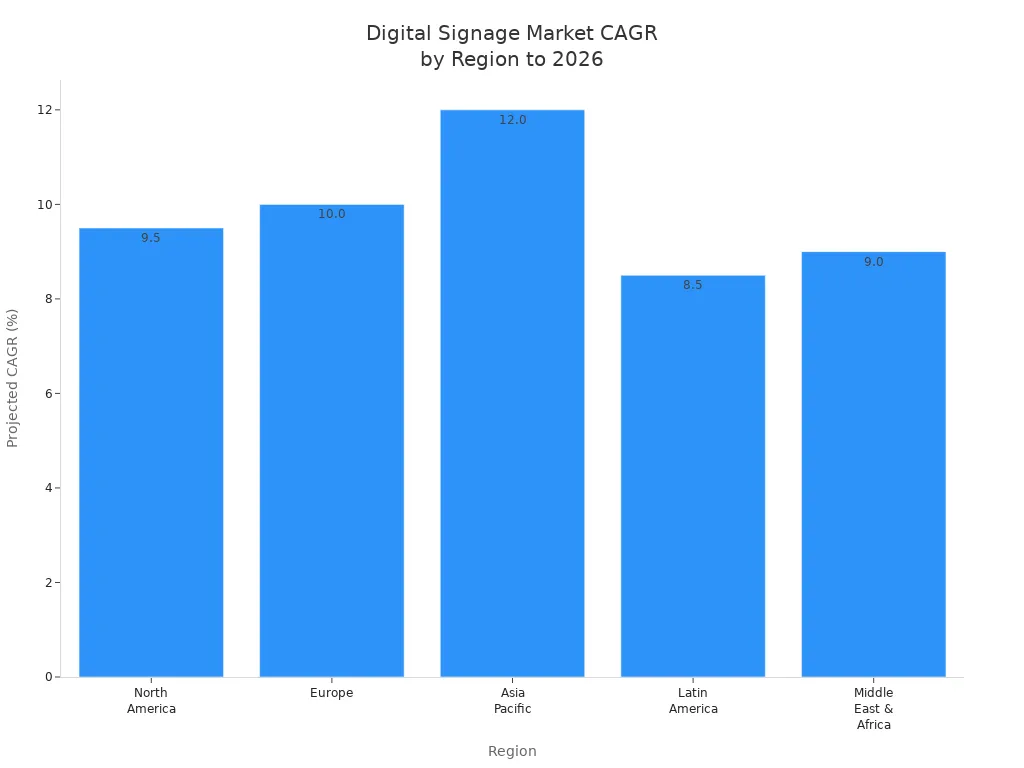
Did you know digital signage is growing fast everywhere? Look at the growth rates for each region through 2026:
Region | Projected CAGR (%) |
|---|---|
North America | 9.50% |
Europe | 10.00% |
Asia Pacific | 12.00% |
Latin America | 8.50% |
Middle East & Africa | 9.00% |
Digital signage display trends change quickly. ai lets you make messages just for your audience and answer right away. Interactive displays let customers join in and have fun. Smart features show you what works and help you change fast. These digital signage trends help you do better and make your business special. Think about how you can use these new tools to get more people interested and help your business grow.
Key Takeaways
AI personalization helps connect with customers by changing messages for each person.
Real-time updates make digital signage new and let businesses react fast to news.
Interactive displays make fun experiences and get customers to join in and learn about products.
Cross-platform integration lets everything work well on many devices and makes it simple to manage.
Sustainability in digital signage is important; using green materials and screens that save energy helps the Earth and your business.
AI in Digital Signage Display

Personalization and Smart Content
AI is changing how people use digital signage display. Now, you can show messages that match each person. AI-powered personalization uses data like age, gender, and shopping history. For example, smart mirrors in stores suggest outfits for your body type and style. Retailers use digital signage technology to show deals or products just for you. This makes your visit more fun and interactive.
AI-driven digital signage can:
Suggest products you might like.
Change messages for the weather or what is popular.
Show promotions that fit your interests.
When you use ai-powered personalization, customers feel special. This helps people pay more attention and buy more. You can see the results in the table below:
Metric | Impact |
|---|---|
Viewing Time | Customers look at signs for longer |
Engagement Rates | More people interact with the content |
Conversion Impact | Sales and purchases increase |
Responsive and Real-Time Updates
AI helps keep your digital signage fresh and up to date. You do not need to change content by hand. AI-driven automation and API integrations update signs with live news, weather, or social media feeds. This means your messages are always current and helpful.
With real-time updates, you can:
Show live sports scores or news headlines.
Share social media posts as they happen.
Change content based on who is watching.
These digital signage trends make displays smarter and more useful. You can react to changes quickly and keep people interested. AI makes digital signage more interactive and helps you stand out.
Interactive Digital Signage Trends
Touch and Gesture Controls
Digital signage display is changing with touch and gesture controls. You can use your hands or simple moves to look at products or get info. Sometimes, you do not even need to touch the screen. This helps keep things clean and safe in places like hospitals and museums. In stores, you can check out products and learn more before buying. At school or work, interactive signage makes it fun to share data or teach lessons.
Here is how different sectors use touch and gesture controls:
Sector | Application |
|---|---|
Retail and Advertising | Users can interact with products without physical contact, enhancing customer engagement. |
Healthcare | Provides information and check-in options without touching surfaces, improving hygiene and safety. |
Museums and Exhibitions | Enhances interactivity of exhibits, allowing users to navigate and learn through gestures. |
Corporate and Education | Facilitates data presentation and interactive lessons without the need for physical interaction. |
Moving pictures and bright colors on digital signage catch your eye. Soft animations make people stay 12% longer. When you spend more time with fun content, you find new things and buy more. Interactive digital signage grabs your attention in just a few seconds.
Hyper-Interactive Experiences
Digital signage trends are moving toward hyper-interactive experiences. These displays use location tools and let you get info by interacting. In stores, these experiences help you choose what to buy and get better service. Hotels use interactive digital signage to guide you and make your visit nice.
Source | Key Points |
|---|---|
Black Box | Enhances customer journey with immersive experiences, location-based connectivity, and interactive access to information. |
CRI | Digital signage activates visual merchandising, aids decision-making, and enhances customer service transparency. |
RetailNext | 58% of consumers value immersive experiences, influencing their purchasing decisions, especially among younger shoppers. |
Personalization and interactivity work together to make cool moments. Interactive signage gets people involved and helps you feel close to the brand. These trends show digital signage is more than just screens. It is about making experiences that make you want to stay and come back.
Cross-Platform and Universal Integration
Device Compatibility
You want your digital signage display to work everywhere. There are many screens, like tablets and big LED walls. Each screen might use a different system. This makes it hard to control all screens at once. You need smart tools to keep everything working well.
Here is a table that shows ways to manage devices in digital signage:
Management Type | Description | Key Features |
|---|---|---|
Mobile Device Management (MDM) | Handles many signage devices, first made for mobile devices. | Works with iOS, Android, Apple TV, and more. |
Remote Device Management (RDM) | Controls devices from far away, no matter where they are. | Good for media players and Android displays. |
Unified Endpoint Management (UEM) | Mixes MDM and RDM for better control. | Supports many platforms, has remote checks, and can grow bigger. |
These tools let you control your digital signage from one spot. This saves time and helps you avoid mistakes. You make sure your screens always show the right things.
Seamless Operation Across Platforms
You want your digital signage to work well everywhere. Your screens should talk to each other, even with different systems. Many companies use these steps to keep things easy:
Standardizing your setup stops problems and makes fixing things simple.
Localizing content lets you share messages in the right language and style.
Remote management lets you control all screens from one dashboard.
Security steps keep your network safe and protect your data.
When you use these digital signage trends, your system gets stronger and more flexible. You can reach more people and keep your screens updated. Cross-platform integration helps you stay ready as new trends and devices come out.
Social Media and Real-Time Engagement
Content Sharing and Audience Interaction
You can make your digital signage display more fun by letting people share things and join in right away. Showing live social media posts gets attention much faster than old signs. People like seeing their pictures, comments, or hashtags on big screens. This makes them want to join and share even more. You help build a group feeling and keep people interested.
Tip: Ask your customers to use a special hashtag. You can collect their posts and show them on your screens.
Here are some ways real-time social media helps you get more engagement:
Shows live social media posts to grab attention.
Keeps screens new with updates and chats.
Makes viewers feel part of the story.
You can use these digital signage trends to run contests or ask for feedback. People will look at your screens longer and talk about your brand more.
Integrating Social Feeds with Digital Signage
You can link your social feeds with digital signage technology to keep your content fresh and interesting. AI helps you pick what shows up on your screens. It checks for new posts and updates your displays fast. This means you always show the newest news, deals, or customer stories.
Groups use smart ways to make sure their social feeds are right and helpful. Here is a table that shows how you can do this:
Method of Ensuring Accuracy and Relevance | Description |
|---|---|
Synchronization with other digital platforms | Pull in URLs, social feeds, and live data from different systems for a unified brand experience. |
Real-time information updates | Show live data like stock levels or social mentions to keep content engaging. |
Use of AI for content management | AI checks and updates digital signage, so your content stays fresh and your screens work well. |
You can make customers happier and make good choices quickly. These trends help you stay ahead and make your digital signage special.
Accessibility and Multilingual Features
Inclusive Digital Signage Display
You want everyone to use your digital signage display. Accessibility features help people with different abilities. These features make screens easier for everyone. You should follow important standards to help more people. Use clear text contrast so words are easy to read. Non-glare finishes help people see messages in any light. Put tactile signs at the right height for easy touch. Keep space in front of interactive screens clear. Audio descriptions help people who cannot see well. Closed captions help people who cannot hear. You can add other ways to use screens for people with motor disabilities.
Here is a table that shows key accessibility needs for digital signage:
Aspect | Requirement |
|---|---|
Character Height | ⅝ to 2 inches, based on viewing distance |
Text Contrast | Clear contrast, non-glare finish |
Installation Height | Tactile signs 48-60 inches above the floor |
Clear Floor Space | 30 x 48 inches in front of interactive displays |
Audio Descriptions | Needed for visual content |
Closed Captions | Required for all video content |
Interactive Features | Support alternate input methods |
Mounting Height | 27-80 inches from the floor |
Tactile Features | Next to the door on the latch side with clear space for touch reading |
Tip: Test your signage with people who have different needs. This helps you find ways to make it better for everyone.
Meeting Diverse Audience Needs
You reach more people with multilingual features in your digital signage display. Many people like seeing messages in their own language. This helps them understand and feel welcome. Multilingual displays make guests feel comfortable. This can help your business earn more money. Wayfinding systems with language choices help visitors find things fast.
Here is a table that shows the benefits of multilingual digital signage:
Source | Key Points |
|---|---|
ScreenCloud | Multilingual signage increases accessibility, engagement, and comprehension. |
Yesco | Enhances guest comfort and engagement, leading to increased revenue. |
EFLYN | Supports accessibility by providing vital information in preferred languages. |
Digital Signage | 72% of users prefer content in their native language, improving retention and respect. |
You can set up your digital signage to change languages by location or user choice. This shows you care about different people. You build trust and loyalty when you help all your visitors.
LED Technology and Hardware Innovation
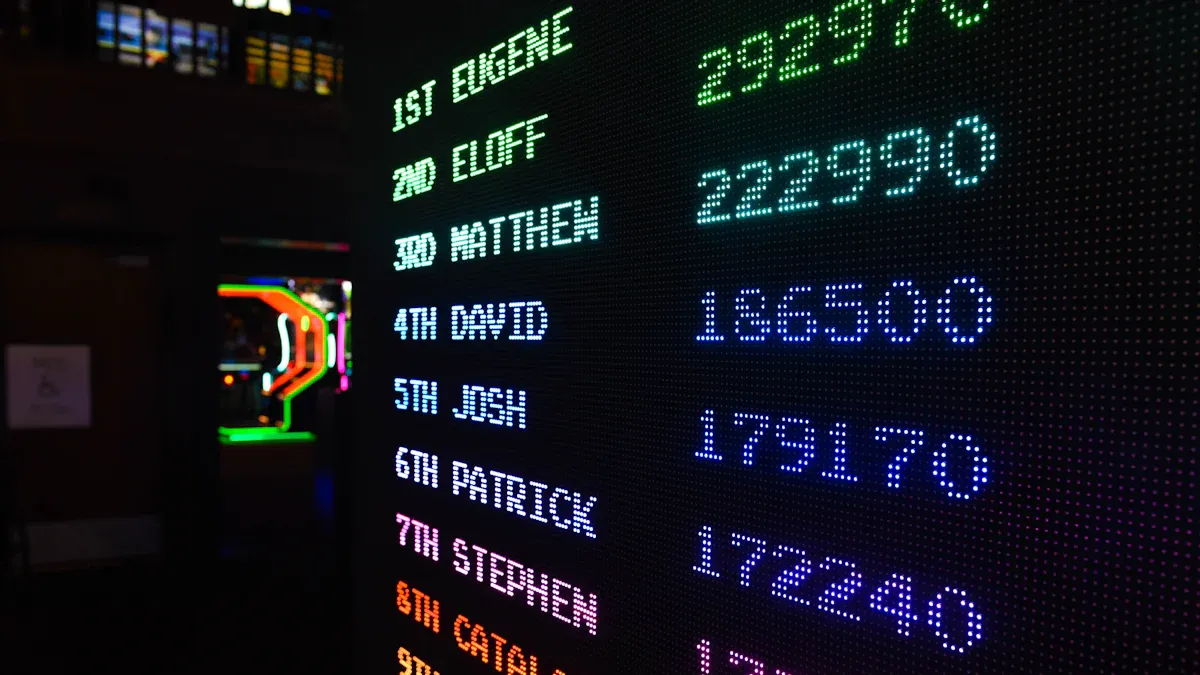
Democratization of High-Quality Displays
Now, you can use great screens even with little money. New tools like Raspberry Pi make digital signage cheap for everyone. Raspberry Pi gives strong features but costs less. You can put screens in stores, restaurants, or offices without spending much. Many small businesses use Raspberry Pi to show menus, ads, or news. This helps you reach more people and share messages.
MicroLED technology also changes how you use digital signage. MicroLED screens show bright colors and clear pictures. They last longer and use less power than old screens. You save money because you do not fix or replace them often. You get better quality for less money.
Innovation | Key Features |
|---|---|
MicroLED | Ultra-high brightness, energy efficiency, pixel-level control, longer lifespan |
Crystal LED | True blacks, modular flexibility, ultra-high refresh rates |
Flexible Displays | Innovative installation options, adaptability to unique spaces, dynamic interactive experiences |
Flexible and Energy-Efficient Solutions
You can put flexible screens on curved walls or furniture. These screens fit almost anywhere. You can make fun experiences for customers in stores or at events. Flexible and rollable screens let you show videos and ads in new ways.
Energy-saving screens help you spend less on electricity. You can change what shows on your screens right away. This means you do not waste paper or other things. Many businesses use brightness and sleep modes to save more energy. These steps help you keep costs low and protect the planet.
Flexible screens fit special spaces and make your business unique.
MicroLED screens stay bright and clear in busy places.
Energy-saving features help you pay less for power.
Tip: Try setting your screens to dim or turn off when not needed. This saves money and helps your digital signage last longer.
Cloud-Based Digital Signage Management
Remote Control and Analytics
Cloud-based digital signage lets you control screens from anywhere. You can manage many screens at once. You do not have to go to each place. Digital signage software helps you check every display’s status. If a screen stops working, you can fix it from far away. This saves time and keeps your content showing.
Analytics tools help you see how people use your screens. You find out which messages get noticed most. You learn how long people look at your displays. You see what makes them act. You use this information to make your campaigns better. Checking analytics often helps you change your content for your audience.
Here are some main benefits of remote control and analytics:
You get live updates for all screens.
You fix problems without going there.
You track how viewers react and see results.
You use data to make smart choices and improve.
Advantage | Description |
|---|---|
Real-time updates | Quickly change content so it stays fresh and important. |
Better reliability | Your screens work well and always show your message. |
High-level security | You control who can use the system to keep things safe. |
Streamlined Content Updates
Cloud-based digital signage helps you change content fast and easily. You use software to plan messages for special times or events. You can set up promotions early or change them right away. You do not need costly servers or lots of IT help. You save money and avoid tech problems.
With Navori’s cloud digital signage software, you can quickly update ads, news, or product info on all your screens.
You can show different messages in different places. For example, you show local deals in one store and event news in another. Real-time updates let you share live info like social media posts or stock levels. This keeps your screens fun and helpful.
You control content for many screens from one place.
You use creative tools and templates to make cool messages.
You work with your team to update content together.
You grow your network easily as your business gets bigger.
With Samsung VXT’s cloud platform, teams can update content from anywhere. You can make changes on many screens at once.
Cloud-based digital signage gives you more choices, saves money, and helps you reach people with the right message at the right time.
Sustainability in Digital Signage
Eco-Friendly Materials and Energy Use
You can help the planet by picking eco-friendly materials for digital signage. Many companies now use recycled plastics and metals for their products. This means they do not need as many new materials. Cold-rolled steel and aluminum alloys are strong and can be used again. Safety glass, like tempered and laminated glass, stays clear and does not break easily. Special coatings stop rust and keep outdoor displays safe. Weatherproofing helps signs last longer in bad weather.
Material Type | Eco-Friendly Attribute |
|---|---|
Cold-rolled steel and aluminum alloys | Strong and easy to recycle |
Tempered and laminated safety glass | Stays clear and does not break easily |
Corrosion-resistant coatings | Good for outside use |
Weatherproofing materials | Helps signs last longer |
You can also pick paints and glues with low VOCs. These give off fewer bad chemicals. If you see EPEAT Gold on a product, it means it uses lots of recycled stuff. Modular designs let you swap out broken parts instead of throwing away the whole thing.
To save energy, use LED, LCD, or OLED screens. These use less power than old screens. You can set times for screens to turn on and off. Using smaller media files also saves energy. Smart sensors and automation turn screens on only when needed. Eco-modes help you lower brightness and save power. Some businesses use solar or wind power for their signs. Keeping displays clean and working well also saves energy. Teach your team how to use less power.
Tip: Smart sensors can turn off screens when no one is there. This easy trick saves energy every day.
Lifecycle Management
You help the earth by managing your digital signage from start to finish. Energy-saving screens use less power and last longer. You can recycle old parts when you get new ones. Throwing away electronics the right way keeps trash out of landfills. Good lifecycle management means less waste and better green habits.
Pick hardware that saves energy.
Recycle old parts to cut down on waste.
Throw away electronics the right way to help the planet.
When you plan for green choices, your digital signage is better for your business and the world. 🌱
Security and Ethics in Digital Signage
Data Privacy and Protection
You must keep your digital signage network safe. Many things can put your screens and data at risk. If you do not protect your system, bad things can happen. You might get malware or see fake content on your screens. Here are some common data privacy risks you should know:
Malware can spread if a media player gets a virus.
SQL injection attacks can happen if software is not safe.
Man-in-the-middle attacks let hackers steal or change data.
Content manipulation can make people lose trust in your signs.
Operational disruptions can stop your screens and cost money.
To keep your network safe, follow the newest security rules. The table below shows important steps you can take:
Security Measure | Description |
|---|---|
Secure Network Connections | Use encrypted connections like VPNs to protect data transmission. |
Network Segmentation | Isolate digital signage systems to limit exposure to threats. |
Intrusion Detection Systems (IDS) | Monitor network traffic for suspicious activities to enable quick responses. |
Regular Backups | Ensure data integrity by performing regular backups of content and configurations. |
Disaster Recovery Planning | Prepare for catastrophic events with updated recovery plans. |
Access Controls | Implement strict access controls to ensure only authorized personnel can access sensitive resources. |
Secure Installation Locations | Install hardware in secure environments to prevent tampering. |
Employee Training | Regular training on security best practices to enhance overall security posture. |
Incident Response Plan | Develop a plan for responding to cybersecurity incidents to minimize impact. |
Tip: Train your team often. Good habits help keep your digital signage safe.
Ethical Use of AI and Analytics
You use ai-driven analytics to learn how customers act. You must do this in a fair and private way. Many groups use strong anonymization and always ask for consent. This helps you give personal experiences but still protect privacy.
Be open and fair with your AI systems to stop bias.
Never save pictures of people or link them to other data.
Study engagement without knowing who people are.
Process data on the spot so images do not leave the site.
You should always keep your audience’s information safe. When you follow ethical rules, people trust you more. Using AI and analytics the right way helps you make good choices and keep privacy safe.
Digital signage display is changing quickly as 2026 gets closer. New trends like ai, cloud-based tools, and flexible hardware are shaping how we share information. You get more benefits when you connect digital signage with your other systems. Scalable solutions help your business grow and work better. To get ready for the future, look at what you use now and think about upgrades. Use this table to help you plan your next steps:
Category | Action Step |
|---|---|
Financial Analysis | Check costs and project savings |
Operational Review | List pain points and needed improvements |
Strategic Alignment | Match signage with your business goals |
Watch for new trends and keep learning about them. If you adapt to changes, your business will be ready for digital signage in 2026.
FAQ
What is the biggest benefit of using AI in digital signage?
AI lets you show messages that fit each person. You can change what’s on the screen very quickly. This makes people pay attention and helps your business get bigger.
How do you keep digital signage content fresh and up to date?
You use cloud-based tools and AI together. These let you update screens from anywhere you are. You can plan new content or switch it right away. This keeps your displays new and interesting.
Can digital signage work with different devices and platforms?
Yes! Modern digital signage works with lots of devices. You can use tablets, TVs, or big LED walls. Management tools help you control all screens from one spot.
How does digital signage help people with disabilities?
Digital signage uses things like audio descriptions and closed captions. It also has clear text that is easy to read. You can add tactile buttons or voice controls. These features help everyone use the screens.
See Also
Innovative Trends Shaping the Future of LED Signage
Exploring Applications and Benefits of Digital Signage in 2025
The Influence of Digital Signage Technology on Modern Communication
Understanding Digital Signage: Benefits and Effective Implementation Strategies
Enhancing Customer Engagement Through Digital Display Signage
