Digital Signage Display Must-Haves for Every Business

Choosing the right digital signage display helps your business talk to people better and keeps them interested. You should look for things like clear pictures, bright screens, strong build, and simple controls.
64% of people using digital signage say it helps them get more customers involved.
Commercial digital signage displays can change messages fast and show new content right away, making the audience’s experience better.
Digital signage lets you change messages quickly without paying to print again, which saves time and work. It helps things run smoother by managing lines and giving out information, so workers can handle harder tasks.
Key Takeaways
Pick displays with high resolution for clear pictures. This helps people notice your screen. It also makes words easy to read.
Make sure your digital signage is bright enough for its place. Change the brightness to save power. This also helps people see better.
Find displays with wide viewing angles. This lets everyone see your screen well. It works no matter where they stand.
Choose strong, commercial-grade displays for busy places. These can handle tough weather and lots of use. This means they last a long time.
Get a simple content management system. This lets you update your digital signage easily. You can do it from anywhere.
Display Quality In Digital Signage

High Resolution
Your digital signage should look clear and sharp. High resolution helps people see your message better. UHD or 4K resolution gives you crisp pictures and text. This makes updates easy to read from far away. People stay interested in your content.
Resolution Type | Pixel Count | Description |
|---|---|---|
UHD | 3840 × 2160 pixels | Four times more detail than Full HD. Great for graphics, schedules, or menus. |
4K | ~4000 pixels (horizontal) | Much sharper than 1080p. It makes things clearer for business use. |
High resolution lets people see details from far away.
Sharp images make your ads look professional and get more attention.
You can show updates, interactive content, and schedules without losing quality.
Brightness Levels
Brightness is very important for digital signage. You need the right brightness for your space. Indoor displays need between 300 and 1,500 nits. Outdoor displays need more, up to 5,000 nits, to be seen in sunlight.
Environment | Recommended Brightness (nits) |
|---|---|
Indoor | 300 - 500 |
Indoor | 500 (for normal indoor light) |
Indoor | 800 - 1,500 |
Outdoor | 2,000 - 2,500 |
Outdoor | 2,000 - 4,000 |
Outdoor | Up to 5,000 |
Indoor signage works with lower brightness because there is less glare. Outdoor signage needs higher brightness to fight sunlight. This keeps your updates easy to read. Always check the brightness before you buy a display.
Tip: Pick a display with adjustable brightness. You can change it for day or night. This saves energy and keeps your content easy to see.
Wide Viewing Angles
Wide viewing angles help more people see your signage. In busy places, people walk by from different sides. You want your display to look good from every angle. IPS technology keeps colors bright and clear, even at wide angles.
Displays for the public must be easy to read from all sides.
Wide viewing angles keep your updates and interactive signage visible.
Colors and brightness stay the same, so everyone gets the right message.
If you use signage in a lobby, store, or event, wide viewing angles help a lot. You do not have to worry about people missing updates.
Anti-Glare Features
Glare can make screens hard to see, especially in bright places. Anti-glare features help your signage stay clear and easy to read. Look for displays with anti-glare coatings and better visibility.
Feature | Description |
|---|---|
Anti-Glare Coating | Cuts down screen reflection in bright rooms. |
Visibility Enhancement | Makes screens easier and more comfortable to view. |
Resolution | Four times higher than FHD, for sharp images. |
Anti-glare coatings lower reflections, so your updates stay readable. This is important for displays in busy areas. Customers can see your content without hurting their eyes. This helps them pay attention and have a better experience.
Note: Anti-glare features are needed for displays in places with lots of windows or strong lights.
If you focus on high resolution, good brightness, wide viewing angles, and anti-glare, your signage will stand out. These features help you show updates, interactive content, and ads that get noticed and work well.
Durability Of Commercial Digital Signage Displays
Commercial-Grade Build
You want a digital signage display that lasts a long time. Commercial digital signage displays use tough materials. These materials help your display work well in busy places. They also protect your money because they last for years. The table below lists common materials and how strong they are:
Material | Typical Lifespan | Durability Rating | Best Applications |
|---|---|---|---|
Acrylic | 5–10 years | High (Indoor) / Medium (Outdoor) | Lobby signs, wayfinding signage |
Aluminum | 7–15 years | High | Outdoor building signs, pylon sign faces |
Stainless Steel | 10–20 years | Very High | Corporate branding, monument signs |
High-Density Urethane (HDU) | 8–12 years | High | Dimensional signs, monument sign faces |
Polycarbonate | 7–12 years | High | Backlit signs, illuminated awnings |
LED Illumination Components | 50,000+ hours | Very High | Channel letters, cabinet signs |
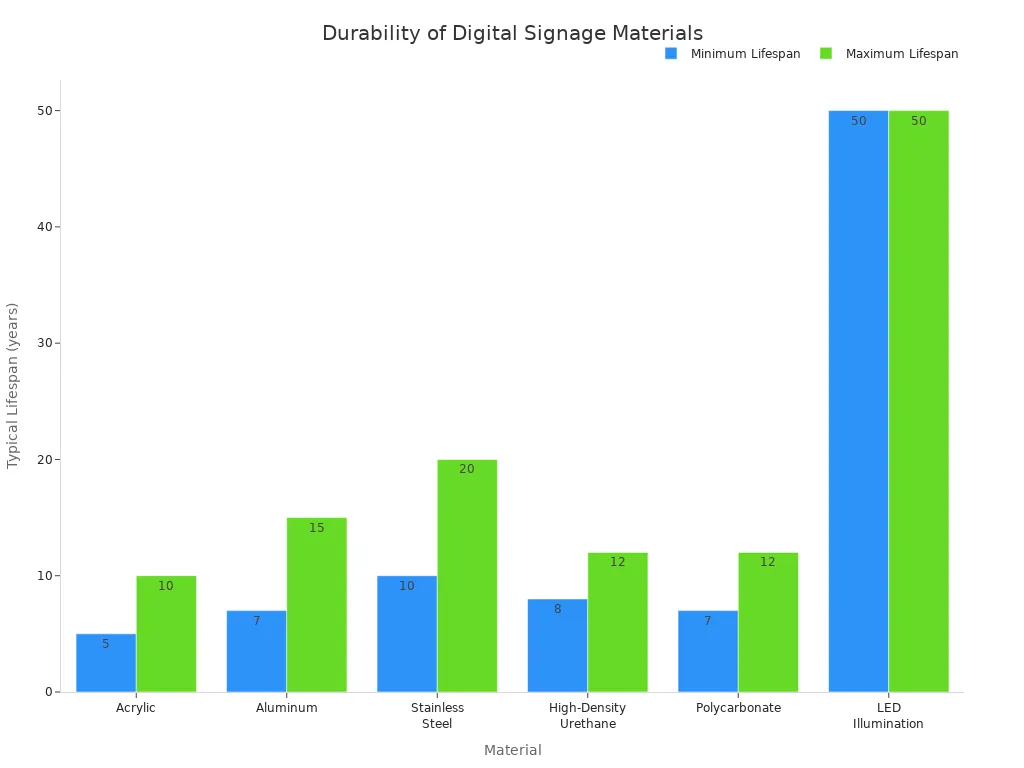
Displays made with these materials can run all the time. They also show new information right away. You get a display you can trust for many years.
Weatherproofing
Outdoor displays need to handle bad weather. You want features that keep your display safe and your content easy to see. Weatherproofing helps your digital signage display work in rain, heat, or cold. Look for these features:
Strong cases keep out water and dust.
Tough glass protects from flying objects.
Sealed parts stop water from getting inside.
IP-rated displays show they block water and dust.
UV protection keeps screens bright in the sun.
These features help your display show new information in any weather. The screen stays bright, and the display works better.
Warranty & Support
A good warranty helps you worry less. Most commercial digital signage displays have a three-year warranty. This means you get free repairs or a new display if something breaks. You also get help from experts and fast replacement if needed. The table below shows what you get:
Warranty Period | Support Services |
|---|---|
3 years | Free repair or replacement, advanced replacement, technical support |
You can get help right away if you have problems. Good support keeps your digital signage software and displays working. This means your business can always share new updates and keep things running smoothly.
Connectivity & Integration In Digital Signage
Input/Output Options
Your digital signage needs to connect to many devices. HDMI, DisplayPort, and USB ports help you do this. You can use media players, computers, and cameras with these ports. Good graphics and fast processors make your display work well. Your ads and interactive features show up without delay. You can add more screens as your business gets bigger. Your updates always look clear and sharp because the system works with different content types.
HDMI, DisplayPort, and USB ports work with lots of devices.
Fast graphics and processors make videos and images look better.
You can add more displays when your business grows.
The system shows all kinds of content without problems.
Network Connectivity
Your digital signage needs a strong network to work well. You can use Wi-Fi, Ethernet, or cellular connections. These choices help you control displays in many places. Your interactive signage keeps working without stopping.
Connectivity Type | Description |
|---|---|
Cellular | Uses mobile networks for quick updates and easy setup. |
Wi-Fi | Connects to local networks for simple updates and features. |
WiMAX | Covers big areas with fast internet for nonstop use. |
Network options help your kiosks and interactive displays stay reliable. You can change content from anywhere. Your digital signage software keeps running all the time.
Media Player Compatibility
Your digital signage should work with many media players. This lets you pick the best hardware for your needs. If your system works with different players, you can use interactive screens and ads without being stuck with one brand. You can add new features and grow your system as technology changes.
Use any media player for fun and changing content.
You are not stuck with one brand, so you have choices.
You can upgrade your displays easily as your business gets bigger.
Content Management System Integration
A good content management system helps you control your signage from one place. You can plan updates, watch your displays, and use real-time data to get people interested. You can change content from far away, check if devices work, and see live numbers. Your displays stay fresh and interactive, and you can act fast when your business needs something new.
For example, a bank used digital signage tools to greet clients by name and share special updates. This made customer satisfaction go up by 30%.
Central management makes your signage reliable and easy to use. You can check how things are working, change updates, and keep your interactive signage interesting.
Ease Of Use & Interactive Management

User-Friendly Interface
You want digital signage software that is easy to use. A user-friendly interface helps you manage interactive signage without trouble. You do not need special skills to control your displays. The best systems let everyone update content and run interactive experiences with ease.
The interface should be simple and easy to understand.
You get support that helps you at every step.
You can manage interactive signage fast and make changes easily.
This helps your business work better. You spend less time teaching and more time making fun experiences.
Remote Access
Remote access lets you control your interactive signage from anywhere. You can update displays in many places without leaving your office. Central control helps you manage kiosks and screens right away.
You watch all displays from one dashboard.
You fix problems quickly and keep signage working well.
Automated tasks save time and lower downtime.
Remote access gives you more freedom. You keep your interactive signage new and working all the time.
Scheduling Tools
Scheduling tools help you plan content and set updates. You pick when your signage shows new messages or deals. The table below compares popular platforms:
Platform | Main Focus | Key Features |
|---|---|---|
Look DS | Advanced scheduling, management | Tags-based scheduling, drag-and-drop editor, playlists, templates, analytics |
Yodeck | Simplicity and fast setup | Remote management, scheduling, built-in apps |
Wallboard | No-code content creation | Drag-and-drop editor, scheduling, real-time data feeds, analytics |
You use these tools to keep signage up to date. You set kiosks to show the right info at the right time.
Interactive Features
Interactive features make your signage more fun. Touchscreens, QR codes, and kiosks let customers interact with your content. You create experiences that make people happy and help them remember your message. Interactivity lets you learn what customers like and want. This helps you make better choices for your business.
Interactive signage helps you connect with your audience. You offer self-service and user-driven experiences that make your business special.
Tip: Use interactive signage to get feedback and learn what your customers want. This helps you grow and change fast.
Scalability & Multi-Screen Support
Modular Design
You want your digital signage system to grow with your business. Modular design lets you add new displays when you need them. You do not have to replace your whole system. This helps you save time and money.
Modular systems let you add screens without big changes.
You can control your budget by adding screens slowly.
You do not need to stop work for upgrades, so you avoid downtime.
With modular design, you are ready for new needs. You can start with a few screens and add more as your business grows.
Multi-Screen Setup
Multi-screen setups make your presentations more fun. You can show different things on each screen. For example, play a video on one screen and show live data on another. This keeps people interested.
Multi-screen support lets you show many things at once.
You make your space exciting with bright screens everywhere.
Synchronization features keep all screens showing the right content together.
Your messages get stronger and more lively. People pay more attention when you use more than one screen.
Future-Proofing
You want your digital signage to last a long time. Pick displays that can work with new technology. Look for systems that support new media players and software. This helps you stay ready as things change.
Choose displays that work with new tech and can grow.
Use features like AI, machine learning, and touchless controls to keep your signage up to date.
Pick energy-saving screens, like LED displays, to save power and help the planet.
If you plan for the future, you protect your money. Your digital signage stays helpful and works well as trends change.
Security In Digital Signage Display Systems
Data Protection
It is important to keep data safe when using digital signage. Some displays collect user information, so you must protect it. Always tell people if your signage uses cameras or sensors. Do not show private data on public screens. Only collect anonymous data from interactive displays to protect privacy.
You can follow these steps to keep data safe:
Install security updates often to fix problems.
Pick signage providers with ISO-27001 certification for safe data handling.
Use a monitoring system to find threats quickly.
Encrypt sensitive data when storing and sending it.
Back up data often and make a plan for data breaches.
Rules like GDPR and HIPAA say you must use encryption and access controls. You need to follow these rules to avoid fines and keep trust. Penetration testing and vulnerability checks help you find and fix security issues before they cause trouble.
Tip: Always update your software and check your security settings. This helps you stop attacks before they start.
Access Controls
Access controls help keep your digital signage safe from changes you do not want. You need strong passwords and multi-factor authentication to limit who can control your displays. Only trusted workers should have access to the system.
Try these access control steps:
Use multi-factor authentication for every user.
Make people use hard passwords and change them often.
Use access control lists so only allowed people can make changes.
Keep signage devices on a secure network.
Watch for unauthorized access and check logs often.
Role-based access control (RBAC) gives each person only the permissions they need. This stops people from making changes they should not make. Using strict access controls lowers the risk of data breaches and keeps your content safe.
Note: Strong access controls help protect your business reputation and keep your signage working well.
Energy Efficiency & Cost Management
Power Consumption
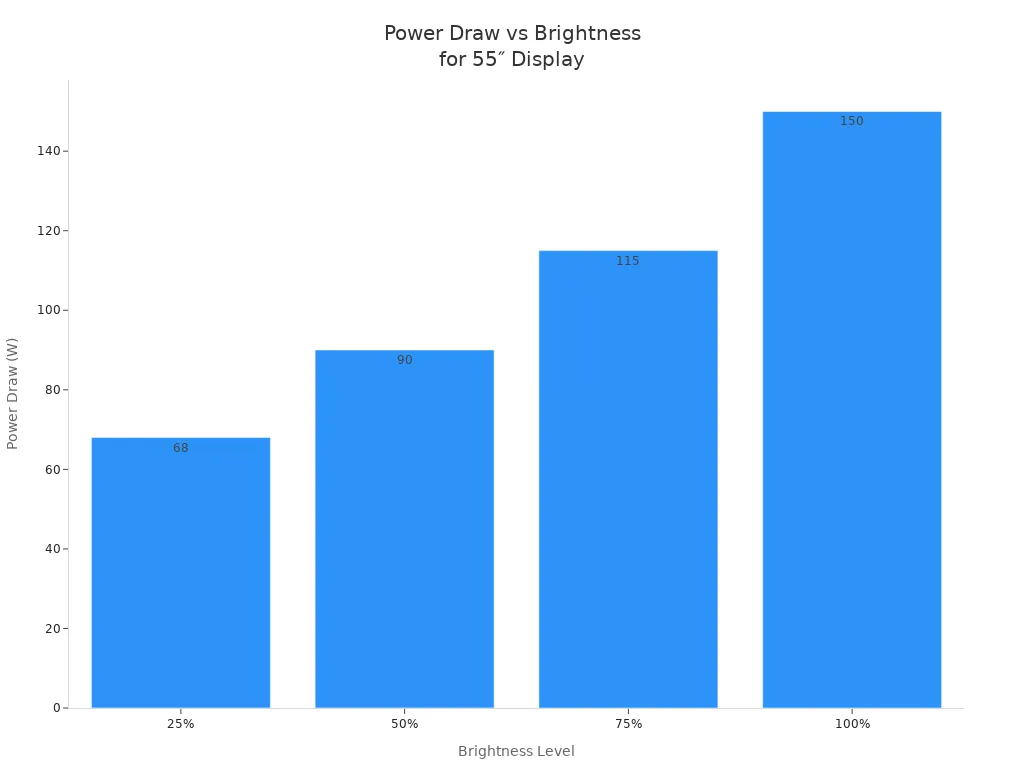
You need to think about how much electricity your digital signage uses. Power draw changes with brightness. Lowering brightness saves energy and money. The table below shows how a 55-inch display uses power at different brightness levels:
Brightness Level | Power Draw (55″ Display) | % of Max Power |
|---|---|---|
100% | 150W | 100% |
75% | 115W | 77% |
50% | 90W | 60% |
25% | 68W | 45% |
Dropping brightness from 100% to 75% saves 23% on power. You still get most of the light, but you pay less for electricity.
Electricity rates change depending on where your business is. In Wyoming, you pay about $0.084 per kWh. In Hawaii, the rate can reach $0.354 per kWh. Most businesses pay between $0.10 and $0.18 per kWh. If you run many displays, your monthly bill can be $200 in Louisiana or over $600 in Hawaii. You save money by lowering brightness and picking energy-saving screens.
Tip: Set your displays to lower brightness at night or in shaded areas. This helps you cut costs and extend the life of your screens.
Maintenance Needs
You must keep your digital signage working well. Regular maintenance helps your displays last longer and work better. If you skip maintenance, you might pay more for repairs and lose time when your screens stop working.
Set aside 10-15% of your hardware cost each year for maintenance.
Use remote monitoring to spot problems early. This can save $100-$300 each time you avoid a technician visit.
Choose commercial-grade displays. These need less maintenance than consumer-grade screens.
Plan for technical support and warranty extensions. Manufacturer warranties often give better value than third-party contracts.
A good maintenance plan keeps your signage running and helps you avoid surprise costs. You spend less time fixing problems and more time sharing your message.
Flexible Mounting & Deployment
Mounting Options
You can mount digital signage in many ways. The right mount makes setup simple. It helps you reach more people. Each mount type gives you different choices. The table below shows the main options:
Mount Type | Functionality | Installation Flexibility |
|---|---|---|
Fixed Wall Mount | Best for front viewing, no changes after setup. | Limited; cannot adjust after installation. |
Tilting Wall Mount | Lets you tilt up or down to cut glare. | Moderate; can adjust tilt after installation. |
Full-Motion Mount | Moves and turns for lots of flexibility. | High; can adjust position and orientation post-installation. |
Ceiling Mount | Hangs from poles, good for open areas. | Moderate; can adjust height but limited side movement. |
Video Wall Mount | Holds many screens in different ways. | High; made for flexible multi-screen setups. |
Floor/Stand Mount | Easy to move, great for short-term use. | Very high; easily movable and adjustable. |
Pick a fixed wall mount for simple needs. If you want to change the angle, use a tilting mount. Full-motion mounts let you move the screen more. Ceiling mounts save wall space in big rooms. Video wall mounts help you use many screens together. Floor or stand mounts are easy to move. You can put these displays anywhere you want.
Tip: Pick a mount that fits your space and lets you update easily. This keeps your signage looking new and easy to see.
Location Flexibility
You can put digital signage almost anywhere. Good spots help more people see your message. The table below shows how location matters:
Aspect | Description |
|---|---|
Screen Placement | Putting screens where lots of people walk by helps more see them. |
Content Adjustment | Changing content for each spot makes it work better. |
Engagement Level | Screens at eye level share more details than far-away billboards. |
You can change your content fast. This keeps your messages fresh.
You can show different things in different places. This helps you talk to local people and keep your brand strong.
Digital signage changes often and gives new information. This keeps people interested and helps your business.
You get the best results when you match your mount and location to your goals. This makes your digital signage system work well and help your business.
You can get more people interested with the right digital signage display. Look at these important features before you pick a commercial digital signage display:
Look at how big the display is and where it will go.
Pick displays that use new technology and save energy.
Make a plan for how you will manage content and grow later.
Talk to a digital signage expert. They can help you choose displays that fit your business and keep people paying attention.
FAQ
What is the best screen size for my business?
You should choose a screen size based on your space and viewing distance. For small rooms, a 43-inch display works well. For large areas, use 55-inch or bigger screens. Measure your space before you buy.
How often should I update digital signage content?
You should update your content at least once a week. Fresh content keeps people interested. For special events or sales, update your screens right away.
Do I need special software to manage my displays?
Yes, you need content management software. This software lets you schedule, update, and monitor your screens from one place. Many systems offer easy drag-and-drop tools.
Can I use my old TV as a digital signage display?
You can use a TV, but commercial displays last longer and work better. TVs may not handle long hours or bright spaces. For best results, pick a display made for business use.
See Also
Maximizing ROI Through Effective Digital Signage Solutions
Utilizing Digital Signage For Effective Information Presentation
Exploring Digital Signage: Advantages, Tech, And Implementation Tips
Best 10 Digital Signage Screens For Business Use Cases
In-Depth Comparison Of Digital Signage Systems For Enterprises
