Top 10 Affordable Digital Signage Display Solutions for Small Businesses


Looking for a digital signage display that does not cost too much? You will like how a digital signage display helps people pay attention. It also makes your business look more professional. A digital signage display gives you more people seeing your messages. It helps you talk to customers better. It is also a cheap way to market your business. Many small businesses say they get more loyal customers. They also say they sell more after using a digital signage display.
Key Takeaways
Digital signage helps customers pay more attention and remember your brand. This can make more people buy from you and come back again. - Pick software that is simple to use and does not cost too much. Make sure it can grow with your business. - Try free trials first to see if the digital signage works for you before you pay for it.
Why Digital Signage Display Matters for Small Businesses

Cost and ROI
You want your money to work hard for you. Digital signage helps small businesses do just that. Many owners worry about cost, but digital displays often pay for themselves. You can change your messages anytime without printing new signs. This saves you money and time.
Take a look at how digital signage helps small businesses:
Benefit | Impact |
|---|---|
Increased customer engagement | 64% |
Better customer service | 57% |
More brand awareness | 84% |
Higher customer satisfaction | 46% |
Bigger average purchase amount | 29.5% |
More sales overall | 31.8% |
More people influenced to buy | Over 40% |
More people enter stores because of signage | 76% |
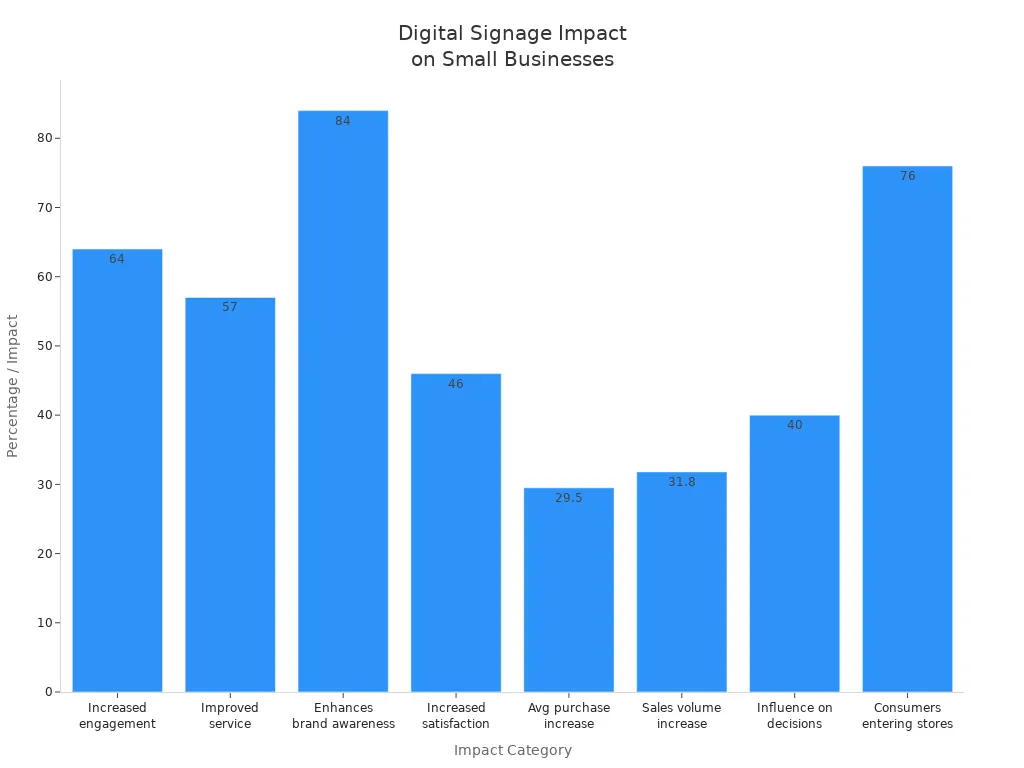
You can see that small businesses get real results. Sales can jump by almost a third. Brand awareness can rise by nearly half. Digital signage also helps you update content quickly, which keeps your messages fresh. Batteries Plus uses digital screens to show the right products at the right time. This smart move brings in more customers and boosts sales.
Tip: Digital signage gives small businesses a big voice without a big cost.
Key Features to Look For
You want the best tools for your small business. Here are the top features you should look for:
Easy to use: Pick software that is simple to learn.
Content management: Make sure you can change and schedule messages fast.
Affordable: Find a system that fits your budget and gives you value.
Scalable: Choose a solution that grows with your small business.
Integration: Make sure it works with your other tools.
Durable hardware: Look for screens that last a long time.
Remote management lets you control your screens from anywhere.
Good support helps you solve problems fast.
Security keeps your data safe.
Small businesses face challenges like cost, copyright rules, and making signs easy for everyone to read. When you pick the right features, you set your small business up for success.
Best Free Digital Signage Software Solutions
You want the best free digital signage software for your small business. You need something simple and reliable. It should have lots of features. Let’s check out the top choices. See which cost-free display tools fit your needs.
Digitalsignage.com
Digitalsignage.com is one of the best free digital signage software options. The setup is easy to use. You do not need tech skills to start. You can create, schedule, and update your content from anywhere. There is a free plan. You can upgrade for more features.
Key Features:
Remote content management
Performance tracking tools
Cloud storage options
Customization for advanced users
Pros:
Good for beginners
Free and paid plans
Professional installation is available
Cons:
You must follow copyright and safety rules
Accessibility compliance may need extra steps
Ideal Use Cases:
Retail stores
Cafés
Service businesses that want fast updates
Tip: Digitalsignage.com gives you flexibility and control. It is one of the best free digital signage software choices for small businesses.
AbleSign
AbleSign is another best free digital signage software for small businesses. You get a free plan to try all the features. The platform is lightweight and easy to use. You can manage your screens without trouble.
Key Features:
Simple interface
Flexible pricing for growth
Professional-grade capabilities
Pros:
Free plan for testing
User-friendly design
Affordable upgrades
Cons:
Free plan has fewer advanced features
Ideal Use Cases:
Small shops
Local offices
Businesses with tight budgets
Note: AbleSign helps you start with digital signage. You do not spend a lot.
OpenSignage.com
OpenSignage.com is one of the best free digital signage software experiences. You can manage your screens online. You can update your content anytime. The platform is made for small businesses that want a simple solution.
Key Features:
Web-based management
Remote updates
Basic scheduling tools
Pros:
No software installation needed
Free for basic needs
Cons:
Limited customization
Fewer templates than some competitors
Ideal Use Cases:
Waiting rooms
Small retail spaces
Quick-service restaurants
NoviSign
NoviSign is a favorite for small businesses wanting the best free digital signage software. You get customizable templates and a drag-and-drop editor. The platform supports interactive content. You can engage your customers.
Feature | Description |
|---|---|
Customizable Templates | Make unique signage that matches your brand. |
Drag-and-Drop Editor | Build content easily, even if you are not tech-savvy. |
Interactive Content Support | Add dynamic displays to boost customer engagement. |
Cloud-Based Management | Control your screens from anywhere. |
Pros:
Easy content creation
Interactive features
Cloud management
Cons:
Free plan limits screens and storage
Ideal Use Cases:
Boutiques
Salons
Businesses that want interactive displays
PosterBooking
PosterBooking is one of the best free digital signage software platforms for small businesses. You can connect up to 10 screens on the free plan. Setup takes less than five minutes. You do not need tech skills.
Feature | PosterBooking (Free) | Yodeck (Free) | Screenly OSE |
|---|---|---|---|
Free Screens Allowed | 10 Screens | 1 | Limited |
Setup Time | <5 minutes | <15 minutes | 30–60 minutes |
Branding on Screens | None | None | None |
Templates Available | Yes | Yes | Limited |
Tech Skills Required | Low | Low | Medium-High |
Pros:
Generous free plan features
Fast setup
No branding on screens
Cons:
Advanced features need a paid plan
Ideal Use Cases:
Chains with many locations
Restaurants
Businesses needing quick deployment
EasySignage
EasySignage is another best free digital signage software to consider. The platform helps you make eye-catching displays. You can update your content often.
Pros | Cons |
|---|---|
Consumers may be overwhelmed | |
Capable of frequently updating material | Expensive initial expenditure |
Better use of space | Complex upkeep |
Long-term financial gains |
Pros:
Good for frequent updates
Makes your space look modern
Cons:
Initial setup can cost a lot
Maintenance may be complex
Ideal Use Cases:
Retail stores
Event venues
Businesses with changing promotions
Juuno
Juuno is one of the best free digital signage software solutions for small businesses. You can use it to show menus, share company updates, and highlight social media posts.
Ideal Use Cases:
Internal company updates
Social media highlights
Customer-facing content in any industry
Pros:
Many content options
Easy to manage
Cons:
Free plan may limit advanced features
Tip: Juuno helps you keep your customers informed and engaged.
SignStream
SignStream is another best free digital signage software option. The platform is simple and reliable. You can manage your screens remotely. You can schedule your content easily.
Key Features:
Remote management
Simple scheduling
Basic templates
Pros:
Easy to use
Reliable performance
Cons:
Limited customization
Fewer advanced features
Ideal Use Cases:
Small offices
Healthcare waiting areas
Local retail shops
Yodeck
Yodeck is a top pick for best free digital signage software. You get one free screen forever. This is good for testing or running one display. The platform is reliable. It has strong customer support.
Why Yodeck Stands Out:
Affordable upgrades
User-friendly management
Scalable for single or many screens
Free players based on Raspberry Pi
Playlist scheduling and remote control
Integrates with Dropbox, OneDrive, and Google Drive
Pros:
Reliable for small setups
Easy onboarding and troubleshooting
Supports many hardware options
Cons:
Free plan is limited to one screen
Advanced features need a paid plan
Ideal Use Cases:
Small retail counters
Reception areas
Businesses testing digital signage
Note: Yodeck’s free plan features make it a smart choice. You can start small and grow later.
You have many choices for the best free digital signage software. Each platform offers something special. You may need cost-free display tools for one screen. You may want to manage many displays. Look for free plan features that match your business needs. Try a few options. See which one helps you engage your customers and grow your brand.
Affordable Digital Signage Display Options
Sometimes free plans do not have enough features. Many small businesses want more tools and better help. They pick an affordable digital signage platform for extra options. These platforms give you more ways to show your messages.
Yodeck
Yodeck is a good choice for small businesses. You can use one screen for free. The paid plan lets you use more screens and features. If you get the yearly plan, Yodeck sends you a free media player. This helps you save money on hardware.Plan Type
Price
Features
Free
$0
One screen, basic features
Paid
$8/month
More screens, advanced scheduling, HD/4K content, remote management
Most digital signage displays cost about $200. Media players cost between $100 and $300. Yodeck gives you a free player, so you spend less.
Raydiant
Raydiant works for one store or many stores. You can control many screens at once. You can show moving displays in your business. Raydiant is best if you want to grow or need special features.SmarterSign
SmarterSign is made for small and medium businesses. It is easy to use. You can pick a price that fits your needs. The tools help you make cool content fast.Spectrio
Spectrio gives you everything you need. You get easy software and ready-to-use templates. They can even make content for you. It is simple to use. The price is higher, but you get more help.Stratacache
Stratacache helps you talk to customers and share content. You get smart tools like real-time analytics. This is a good choice if you want strong hardware and powerful features.
Tip: Try a monthly plan first. You can test features and see what works best for your business.
Here is a quick chart of popular paid plans:
Platform | Starting Price | Best For | Notable Features |
|---|---|---|---|
Yodeck | $8/month | Retail, offices, restaurants | Free media player, remote management |
Raydiant | Custom pricing | Multi-location businesses | Multi-screen support, dynamic displays |
SmarterSign | Tiered pricing | Small/medium businesses | Easy templates, affordable plans |
Spectrio | Custom pricing | Businesses wanting full service | Content creation, installation |
Stratacache | Custom pricing | Advanced analytics needs | Real-time data, hardware options |
There are many affordable digital signage choices. You can pick a simple plan or get more features. These platforms help you show messages, get more customers, and grow your brand.
Comparison of Digital Signage Solutions
Price and Feature Overview
There are many digital signage solutions. They have different prices and features. Some platforms let you use them for free. Others make you pay every month. You can start with a simple setup for about $200. This price includes a TV and a streaming device. What you pay later depends on what you need. Paid software usually starts at $15 each month for every screen. PiSignage lets you use two screens for free. If you want more, you pay only $1.67 each month for extras.
Here’s a quick look at how some popular options compare:
Solution | Features | Pricing Model | Scalability |
|---|---|---|---|
PlaySignage | Easy to use, works with many media types | Paid, flexible plans | Good for any business size |
Raydiant | Fast to set up, works well | Custom pricing | Can manage many screens |
Scala | Has advanced tools and analytics | Custom pricing | Works for small or big setups |
truDigital | Shows moving content, easy to connect | Paid, starts at $15/month | Good for all business sizes |
PiSignage | Pro features, easy to start | Free for 2 screens, $1.67/mo | Best for small businesses |
Tip: Try free plans to see what you like. Some plans have extra costs, so check before you buy.
Suitability for Small Businesses
You need digital signage that fits your business and industry. Canva Pro is good if you want to save money and make your own designs. Nento gives you cloud storage and works with cheap devices. But if you use many screens, the price can go up. Yodeck gives you good quality and free hardware if you pay for a year. This makes it a great deal. NoviSign is best if you want customers to interact with your displays. Rise Vision helps schools and small groups with free templates and low starting costs.
More people see your business
Customers pay more attention
Your brand gets noticed
You save money when you talk to customers
Digital signage does more than show pictures on screens. It helps you talk to customers and share news. It also helps your business grow. You get good value if you pick the right plan for your needs.
How to Choose the Right Digital Signage Display
Hardware Needs
You want your digital signage to work well right away. First, pick hardware that fits your space. Most small businesses use LED or LCD screens. These screens usually cost about $200. If you want a bigger effect, you can buy 4K screens. Media players help you show your content. Standalone devices let you try new ideas. These cost between $100 and $300. Remember to get mounting equipment too. You can put your display on a wall, ceiling, or stand. This helps customers see it easily. The setup is simple and quick. You can start using digital signage fast.
Scalability
Your business might grow over time. You need digital signage that can grow with you. Many cloud-based platforms let you add more screens or features. Xibo Signage has a dashboard that is easy to use. It also has a cloud-based cms. You can begin with one screen and add more later. Remote management lets you control screens in different places. You can test new ideas without spending a lot. Scalability means you do not need to buy all new equipment when you expand.
Support and Ease of Use
You do not want to spend lots of time learning software. Choose digital signage that is easy to set up. The software should be simple to use. Many platforms give you quick training. Sometimes you only need an hour to learn. Good support and live help keep your screens working. A cloud-based cms lets you change content from anywhere. You can update screens and set schedules with a few clicks. This makes digital signage easy for everyone, even if you are new to it.
You have lots of choices for digital signage. Here’s a quick look:
Solution | Free Plan | Pricing Options | Key Features |
|---|---|---|---|
Yodeck | Yes | $7.99–$12.99/mo | Scheduling, templates, easy growth |
Try free plans first. For your business, pick software that is easy to use and fits your budget.
Use simple hardware like smart TVs.
Choose tools with templates and remote control.
Upgrade as you grow.
Plan your content.
Place screens where customers look most.
Free trials help you test features before you spend money.
FAQ
How do you start a trial for digital signage software?
You can go online and sign up for a trial. Most platforms let you try features before you pay. You can test remote management to see if it works for you.
Can you control your digital signage displays remote?
Yes, you can control screens from anywhere. You can use your phone or computer. A trial lets you see how remote control works for your business.
What happens when your trial ends?
When your trial ends, you can upgrade or stop. If you like remote features, you can keep using them. Some platforms give you another trial or a discount.
Tip: Always use a trial to check remote features before you choose.
You can try remote updates during your trial.
Test remote scheduling to save time.
Use a trial to see if remote support helps you.
Feature | Trial Available | Remote Control |
|---|---|---|
Yodeck | Yes | Yes |
NoviSign | Yes | Yes |
PosterBooking | Yes | Yes |
Note: Every trial lets you try remote options. You get to see how remote management works for your business.
See Also
10 Best LED Digital Displays for Retail Settings
10 Leading Digital Signage Screens for Business Use
Comparative Analysis of Digital Signage Systems for Enterprises
Custom Digital Signage Solutions for Retail, Healthcare, and Business
